THE SCHOOL DAY, CONNECTED
One connected school management system for every school day.
School management software—also called a school ERP—connects attendance, fees, academics and communication around shared school records.
Start with the people who use it. Then see how the work fits together.
Take a look insideRequest a school walkthroughLOOK INSIDE SCHYLVA
Their own workspace.
STUDENTS · ROLE-AWARE ACCESS
Their day, in one place.
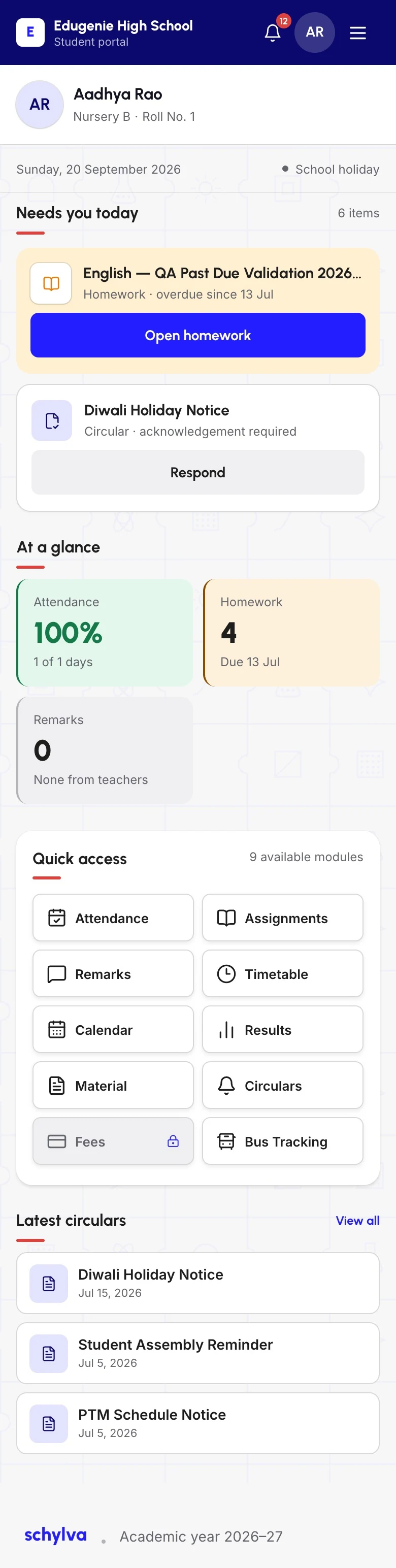
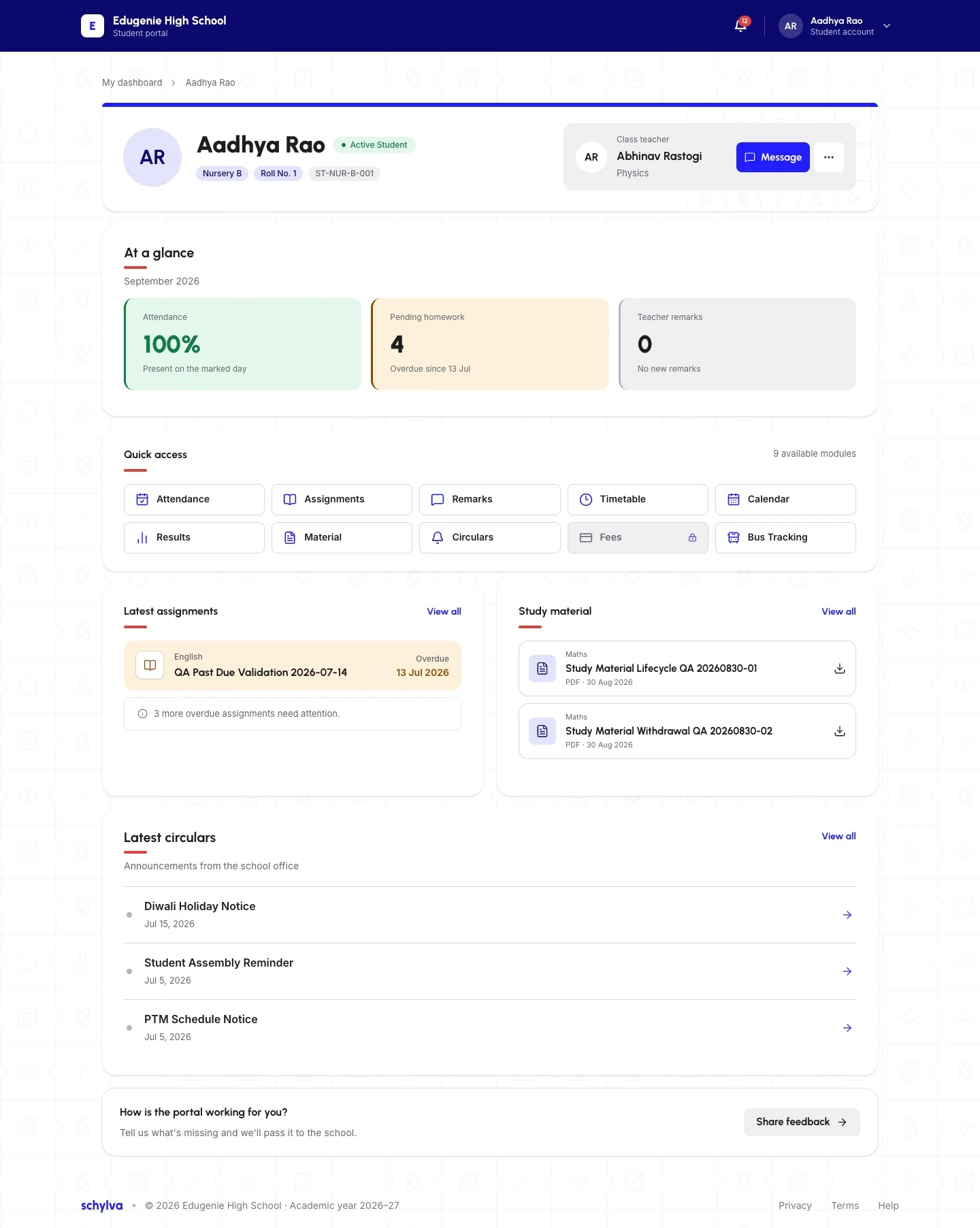
The Student dashboard shows personal school context and available actions. This is the web application, not a native iOS or Android app.
- What they do
- Use the learning and school-day actions available to the account.
- What they review
- Timetables, homework, materials, updates and published results.
One focused school-day view.
Explore Schylva for studentsPARENTS · ROLE-AWARE ACCESS
Close to their school day.
- What they do
- Acknowledge updates and complete configured payments.
- What they review
- Attendance, fees, results, circulars and available school information.
Clearer family follow-up.
Explore Schylva for parentsTEACHERS · ROLE-AWARE ACCESS
A clearer view of the class.
- What they do
- Manage schedules, attendance, homework, materials and class records.
- What they review
- Assigned classes, students and school updates.
Current classroom information.
Explore Schylva for teachersADMINISTRATORS · ROLE-AWARE ACCESS
Coordinate the work behind the day.
This reviewed administrator timetable overview shows class and teacher entry points—not a school-wide dashboard. An updated complete administrator dashboard capture is still pending.
- What they do
- Configure school structure and daily operations.
- What they review
- School-wide status, details and summaries.
A clearer operational picture.
Explore Schylva for administratorsRole-specific access, not one unrestricted dashboard. Responsive web today; native apps in development. Gallery screenshots show approved demo data from the web application.
01 / THE CONNECTED PICTURE
Different tasks.
Shared context.
Class, student, date and school context stay attached to the work. You don’t have to understand every module to understand the platform.
Browse the complete feature directorySix connected areas. Eleven detailed feature guides. These are not separate package tiers.
THE SHARED SCHOOL FOUNDATION
- School
- Academic year
- People
- Classes & sections
- Role access
01Administration and access2 feature guides
Build the school’s working structure.
Organise students, guardians, teachers, classes, sections, school settings and supported accounts inside the correct school context.
02Academics5 feature guides
Connect the teaching day to the published view.
Manage attendance, timetables, homework, study materials, exams and published results from one academic workspace.
03Fees1 feature guide
Keep fee status and payment context together.
Configure fee structures, review class or student status, record offline payments and enable online parent payment when the school has configured Razorpay.
04Communication1 feature guide
Send people to the underlying school record.
Create targeted circulars, track available acknowledgements and record student remarks. In-app and push updates are planned for launch.
05Operations1 feature guide
Give non-academic work the same clarity.
Manage supported transport route records, capacity context, Student assignments and fee settings in the authorised administrator workflow. Parent and Student delivery is outside the current scope.
06Analytics1 feature guide
Review school activity and trends.
Use administrator dashboards for operational summaries, attendance analysis, results analysis and relevant fee-status information.
FOLLOW ONE PIECE OF SCHOOL WORK
A school update.
A relevant student view.
A circular is more than a message sent in isolation. The audience, school record and available acknowledgement state remain part of the context.
- 01
The school prepares it.
A circular is created for the intended school audience.
- 02
The record stays connected.
Audience and school context determine the relevant signed-in view.
- 03
The student opens it.
Available notices and acknowledgement states appear in the Student web experience.
Illustrative workflow. The capture shows the recipient screen only; it does not demonstrate an end-to-end delivery or acknowledgement test.
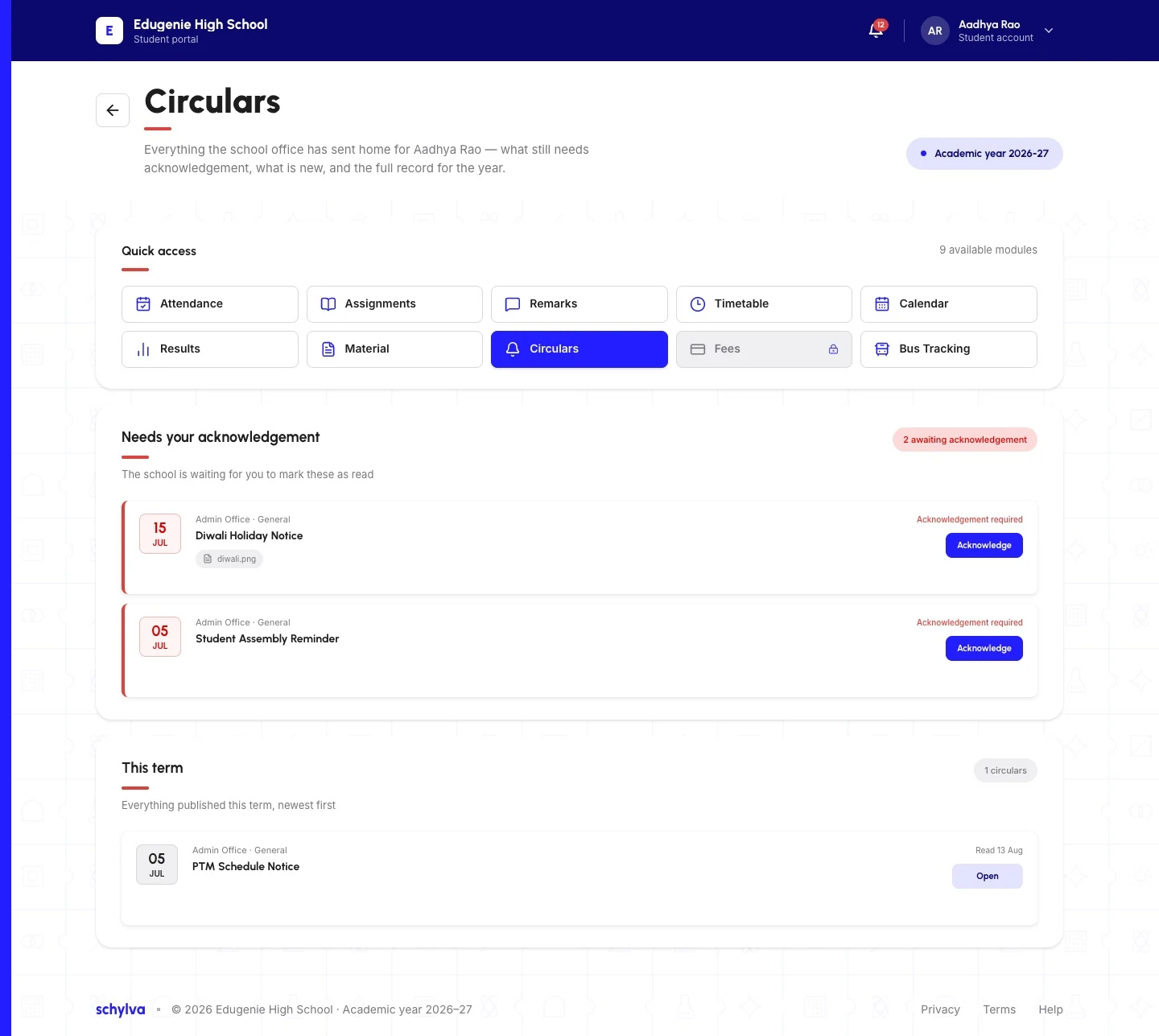
Student view, not Parent messaging. The original notice text and acknowledgement states are unchanged.
Original sample content and acknowledgement states preserved. In-app and push updates are planned for launch; WhatsApp and non-login SMS are not school-update channels.
LOOK BEYOND THIS EXAMPLE
Five everyday workflows.
Open a short walkthrough, then go deeper into the feature that matters to your school.
Attendance
From class roster to school and family views.
A teacher opens the assigned class, completes the daily roster and saves attendance against that class.
- Teacher completes the roster
- Class attendance record is saved
- Relevant school and family views use the record
Fees
From fee structure to the parent payment journey.
The school maintains fee structures, reviews status and makes the configured payment path available to the linked parent account.
- School prepares the fee context
- Status stays linked to the student
- Parent reviews or uses the configured payment path
Timetables
From administrator scheduling to the right daily view.
Administrators maintain class and teacher timetables that reach the relevant teacher, parent and student views.
- Administrator maintains the schedule
- Class and teacher context stays connected
- Relevant roles see the published timetable
Exams and results
From exam setup to published results.
The workflow moves from exam setup and marks entry to results published for the relevant parent and student accounts.
- School prepares the exam context
- Authorised marks work is completed
- Published results reach the relevant accounts
Communication
From a targeted school update to the underlying record.
The school prepares a circular for an audience, and the relevant user opens it inside their Schylva experience.
- School prepares the circular
- Audience and record remain connected
- Relevant roles open the update in Schylva
02 / CHECK THE SCHOOL FIT
Your school’s structure.
The right questions first.
Start with what your school needs to configure, who needs access and where they will use it.
- ACADEMIC CONTEXTBuilt first for schools in India.
Designed for CBSE, ICSE, Indian State Boards, IB, Cambridge and other school frameworks. Academic years, classes, sections, branding and available operational settings follow school configuration. International markets will follow.
Validate board-specific report-card formats and grading scales against your school’s approved academic structure before activation.
Check school and board fit- DEVICE AVAILABILITYWeb today.
Native apps ahead. The responsive web application adapts to desktop, tablet and mobile. Dedicated iOS and Android experiences for administrators, teachers, parents and students are in development, with confirmed role workflows at launch.
The tour shows desktop and mobile-web captures—not native apps or a dedicated tablet capture. Native download links and evidence will appear only when genuinely available.
Review the mobile-app direction- ACCESS & RESPONSIBILITYRelevant views.
Defined boundaries. School-specific context, role-aware access, selected audit visibility and controlled access to available files keep information tied to relevant accounts. Detailed infrastructure guarantees remain unpublished until approved.
Review the security approach
03 / A THOUGHTFUL START
Get ready together.
Then go live.
Standard onboarding, initial configuration, staff training and initial data migration are included. The exact method, supported data, owners and school-specific scope are agreed in writing.
Agree the scope
Choose the workflows, roles and configuration the school needs first.
Prepare and validate
Confirm academic context and the records included in the agreed initial migration.
Help people get started
Train the staff and review relevant access and supported workflows.
Activate when ready
Validate school readiness. There is no universal setup-time or instant go-live promise.
04 / THE INTRODUCTORY SCHOOL OFFER
Room to start.
Clarity about what follows.
Qualifying subscription, licence
and platform-access fees
Waived through your school’s configured 2028–29 academic-year end date—not a fixed two-year period.
- QUALIFY
31 March 2027
Complete school-account activation by 11:59 PM IST. A demo, quote or incomplete onboarding does not qualify.
- CONFIRM THE PERIOD
Your school’s end date.
The academic-year end date must be configured and validated. Approved schools qualify under the full terms and definitive school agreement.
- UNDERSTAND RENEWAL
30% off each year.
Afterward, the discount applies to each year’s applicable school-specific price. It is non-cumulative and does not compound. Student-count pricing is confirmed in your written quote.
Payment-gateway transaction charges remain payable by the school under the provider’s terms. The offer is not free payment processing.
Standard onboarding, initial setup, staff training and initial migration are included within written scope. The qualifying period covers approved launch modules and four-role web experiences, plus their confirmed native experiences at launch. Full offer terms and the definitive school agreement apply.
MAKE AN INFORMED DECISION
Bring your questions.
Ask for the evidence.
Involve the people responsible for operations, academics, finance and rollout. Compare Schylva with two other vendors around your school’s priorities.
Open the free buyer’s guideWeight must-haves, record evidence, identify gaps and print a three-vendor decision summary.
- 01
Which daily tasks should Schylva address first?
Choose the administrative, academic, fee, communication or transport work that creates the most repeated follow-up today.
- 02
Which roles need to act, review or acknowledge?
Confirm what administrators, teachers, parents and students should each be able to do.
- 03
What data and configuration must be prepared?
Discuss the academic year, classes, sections, accounts, fee setup and agreed initial-migration scope.
- 04
Which current boundaries matter to the school?
Confirm any school-specific processes, integrations or compliance requirements that matter before activation.
- 05
What will activation, support and renewal involve?
Review implementation, the student-count pricing basis, the introductory offer and ongoing support before activation.
Current boundaries to include in your evaluation
- WhatsApp is not supported at launch.
- Login verification SMS delivery is not currently available, and non-login SMS is not a school-update channel.
- Live GPS tracking is not currently claimed.
- Transport is limited to authorised administrator records, route capacity context, student assignments and fee settings. Parent and student transport delivery, live GPS tracking and fleet operations are outside the current scope.
- School workflow updates use in-app and push notifications at launch.
THE PRACTICAL DETAILS
Before we say hello.
School fit, setup, support and the conditions worth understanding.
What is school management software?
School management software—often called a school ERP—connects administrative, academic, fee and communication workflows around a school’s records. Schylva provides role-aware experiences for authorised administrators, teachers, parents and students.
Is Schylva only for a particular board?
No. Schylva is being built for all kinds of schools and school boards, with school-specific academic and operational configuration.
Will Schylva work on mobile?
Yes. Full-feature iOS and Android experiences for administrators, teachers, parents and students are part of the launch scope and are currently marked Coming at launch.
How is Schylva pricing determined?
Schylva provides a school-specific quote determined by student count. Public rupee rates are not currently published.
Are onboarding, training and migration included?
Yes. Standard onboarding, initial configuration, staff training and initial data migration are included. The detailed method and service scope are agreed with the school in writing.
Which school workflows does Schylva bring together?
Schylva connects supported attendance, fees, academics, timetables, exams and results, homework, study materials, communication, student information and user-access workflows. Supported transport and School Analytics views remain authorised administrator workflows.
What ongoing product support is included?
Ongoing product support is included. Support operates Monday–Friday, 10:00 AM–6:00 PM IST, excluding public holidays, with a 24–48 working-hour resolution target. This is a target rather than an unconditional guarantee; third-party or school dependencies can require additional time.
How does Schylva separate school and role access?
Each school works in its own configured Schylva environment. Role-aware access limits information and actions to the appropriate account and relationship. Detailed infrastructure guarantees remain unpublished until their evidence and contractual wording are approved.
Does booking a demo qualify the school for the introductory offer?
No. Qualification requires completed school-account activation by 31 March 2027 at 11:59 PM IST. A demo request, quote request or the start of onboarding is not activation.
Does Schylva use WhatsApp or SMS for school updates?
WhatsApp and non-login SMS are not launch communication channels. Login verification SMS delivery is not currently available; school workflow updates use Schylva in-app and push notifications at launch.
YOUR SCHOOL IS THE STARTING POINT
Let’s follow a day
at your school.
A 45-minute walkthrough of a relevant workflow and the roles involved. A conversation about your school—not an instant booking.
Request a school walkthroughOr get a custom quote