{"@context":"https://schema.org","@graph":[{"@type":"WebPage","@id":"https://schylva.com/solutions/parents/#webpage","url":"https://schylva.com/solutions/parents/","name":"School Parent App for Fees & Attendance in India | Schylva","description":"Explore Schylva’s parent portal for child-specific attendance, fees, results, homework and school updates. iOS and Android apps are Coming at launch.","isPartOf":{"@id":"https://schylva.com/#website"},"about":{"@id":"https://schylva.com/#organization"},"inLanguage":"en-IN"},{"@type":"BreadcrumbList","@id":"https://schylva.com/solutions/parents/#breadcrumb","itemListElement":[{"@type":"ListItem","position":1,"name":"Home","item":"https://schylva.com/"},{"@type":"ListItem","position":2,"name":"Solutions","item":"https://schylva.com/solutions/"},{"@type":"ListItem","position":3,"name":"Parents","item":"https://schylva.com/solutions/parents/"}]}]}
A school parent app built around each child’s day.
Schylva gives parents one child-specific web portal for attendance, homework, materials, timetables, results, fees and school updates.
Switch between linked children, open the underlying school record and complete supported acknowledgement or configured payment actions while each account stays inside the authorised family relationship.
Share your school context and approximate student count. We target a response within two working days. Working days exclude weekends and public holidays.
Login verification SMS delivery is not currently available; WhatsApp is not supported.
One family relationship
The right child. The relevant record. A clear next action.
The school prepares the account and family relationship. The parent chooses the linked child, opens the underlying record and completes only the action available in that school and child context.
01
Choose the linked child
Move into the correct student context.
Select the appropriately linked student before reading a school record or taking a supported action.
02
Understand the underlying record
Open the school record—not a disconnected alert.
Review the supported attendance, academic, fee or circular detail relevant to that child.
03
Act in context
Acknowledge or pay only where supported.
Use the available acknowledgement or configured Razorpay payment path without implying private chat or every-gateway support.
The family record guide
Four familiar questions. The school record behind each.
Start with the question you have. The Parent action, school source, connected outcome and current limit stay visible beside the product evidence.
01
Linked child
Which child’s school day am I reviewing?
What the Parent does
Open the account and move into the correct linked child before reviewing any school record.
School source
The school prepares the supported parent account and verifies the appropriate family relationships.
Connected outcome
Attendance, academic, fee and communication information stays inside the selected child context.
Current boundary
Schylva does not claim automatic family matching or access to unrelated children or school records.
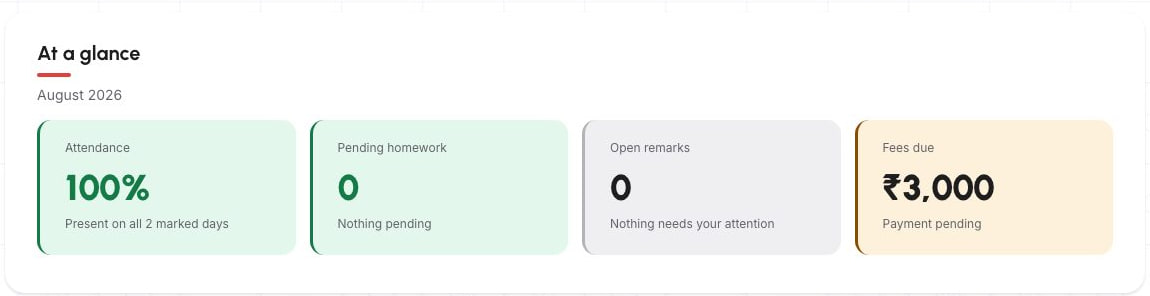
Reviewed sample school data · static responsive-web capture.
Historical August 2026 overview. The sample totals belong to this captured summary; they are not reconciled to the other screenshots on this page or a real family account.
02
Attendance
Was attendance recorded for this child?
What the Parent does
Review the child-specific summary, month, selected date and available yearly view.
School source
The supported class attendance record is completed through the appropriate school or teacher workflow.
Connected outcome
The parent can return to the underlying attendance record instead of relying on a disconnected message or screenshot.
Current boundary
This does not establish biometric attendance, staff attendance, a public correction workflow or a real-time guarantee.
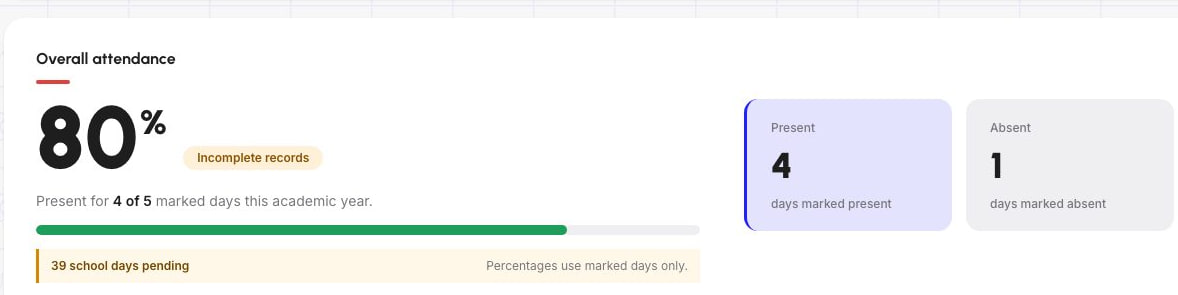
Reviewed sample school data · static responsive-web capture.
Incomplete records are visible: 4 of 5 marked days, with 39 school days pending. The percentage uses marked days only—not every school day. This crop does not show the month, selected-date or yearly views.
03
Fees and payment
Is a fee due, and is a supported payment action available?
What the Parent does
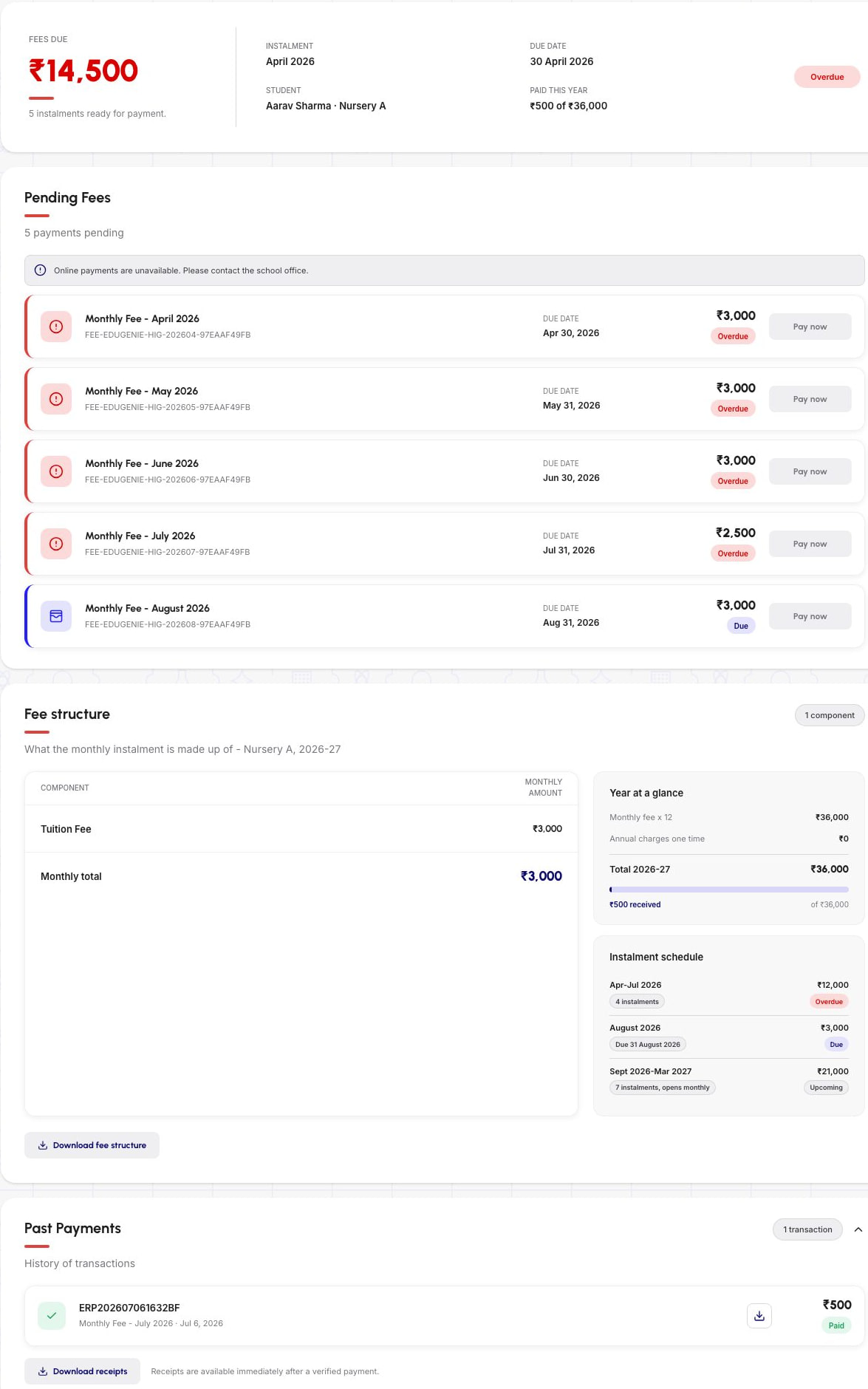
Review the supported due amount and payment history. The captured demo state shows online payments unavailable and disabled Pay now controls; a configured online action is used only in a separately enabled state.
School source
The school prepares the supported fee structure, student status and configured Razorpay payment path.
Connected outcome
When the school enables and configures online payment, the supported provider flow remains attached to the correct school and child context.
Current boundary
Payment-provider transaction charges remain payable under the provider’s terms.
This does not promise zero gateway charges, refunds, invoices, every gateway or a payment guarantee.
Reviewed sample school data · static responsive-web capture.
The unavailable-payment notice and disabled Pay now controls are retained. Sample school fees are not Schylva subscription prices. Past payment history is not evidence of a new successful payment or a working checkout in this static capture.
04
School update
What did the school publish, and does it need acknowledgement?
What the Parent does
Open the underlying record and use the supported acknowledgement path when available.
School source
The school publishes a supported circular or remark for the appropriate audience.
Connected outcome
The current or historical record and acknowledgement state remain available in the parent context.
Current boundary
This is not private chat, a universal read receipt, WhatsApp delivery, email delivery or non-login SMS notification.
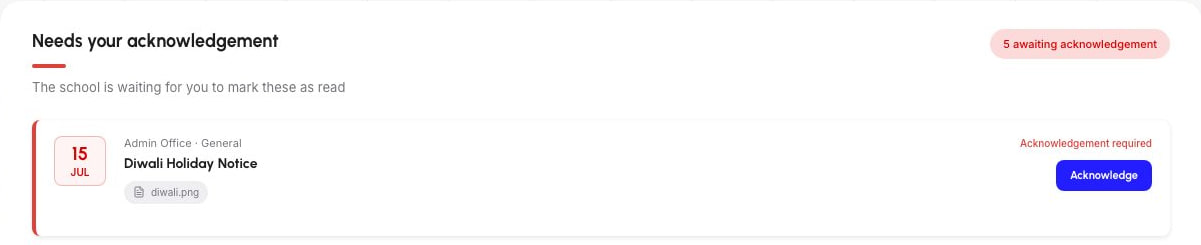
Reviewed sample school data · static responsive-web capture.
One circular and an available acknowledgement action are visible; the five-awaiting badge is a captured total, not five rows shown here. This is not a completed acknowledgement or a universal read receipt.
These five example screenshots use sample school data. They show separate views, not one family’s complete journey or a matched date range. They do not demonstrate an enabled payment checkout or a completed acknowledgement.
One school source, separate role experiences
School records. A child-specific family view.
Administrators and teachers prepare the appropriate records. The verified family relationship determines which child-specific information and supported actions reach the parent account.
School operations
School administrators
Prepare accounts, family relationships, fees, timetables, exams and circulars. Transport assignments remain a separate administrator workflow and are not delivered here.
Prepare the relationship. Validate the family experience.
Parent adoption depends on the correct school account, verified family relationships and representative records—not on asking families to discover an unconfigured portal.
School and account context
Prepare supported parent accounts, verify the intended family relationships and confirm representative single-child and multi-child examples.
Initial migration and staff training
Initial migration and staff training are included. The method, records, validation responsibilities, timing and training arrangement are confirmed in writing for the school.
Representative parent validation
Review one attendance or academic record, one fee and configured payment case, one circular or remark acknowledgement, and what must remain outside the parent view.
Ongoing product support
Support is included Monday to Friday, 10:00 AM to 6:00 PM IST, excluding public holidays, with a 24–48 working hour resolution target and approved dependency exceptions.
Support resolution is a target, not a guarantee; third-party and school dependencies may require additional time.
Parent apps · Coming at launch
The complete Parent role. Planned for iOS and Android.
The apps are not currently available to download. At launch, the approved parent workflows will use mobile-appropriate controls and applicable notifications that return families to the underlying child-specific record.
Complete approved parent role parity is Coming at launch
Applicable in-app and push notification direction is Coming at launch
Login verification SMS delivery is not currently available
WhatsApp and non-login notification SMS are not supported
Optional in-product notification-category controls are not available at launch
Operating-system and device notification controls still apply
Questions parents and school teams ask
Clear answers. Before families begin.
Linked children, supported actions, availability and school responsibilities.
What can parents do in Schylva?
Parents can move between appropriately linked children and review the supported attendance, homework, materials, remarks, calendar, timetable, published results, fees and circulars relevant to the selected child. Supported acknowledgement and configured parent payment actions remain attached to the underlying school record.
Can one parent account include more than one child?
Yes. The parent experience supports moving between children connected through the appropriate school and family relationship. Schylva does not claim automatic family matching or access to unrelated records.
How does Schylva keep child-specific access separate?
The school prepares the supported account and family relationships. The parent chooses a linked child before opening a record, and the experience stays inside the configured school, account and relationship context. This describes the current role model and is not an absolute security guarantee.
Can parents pay school fees online through Schylva?
Yes, when the school has configured the supported Razorpay journey. Parents can review the supported fee status and payment history and use the available configured payment action. Provider transaction charges remain payable under the provider’s terms.
Does Schylva send parent updates through WhatsApp or notification SMS?
No. WhatsApp and non-login SMS are not supported product channels. Login verification SMS delivery is not currently available. Applicable in-app and push notification direction is Coming at launch.
Does Schylva provide live bus tracking?
No. The current Parent workflow does not provide transport route or assignment information, live GPS, maps or ETA. Transport records are maintained in the authorised administrator workflow.
Does the parent portal support CBSE, ICSE and State Board schools?
Yes. Schylva supports school workflows across CBSE, ICSE and State Board contexts. The school configures the applicable academic structure, grading scale and board-specific report-card format before the appropriate published outcome reaches the parent account.
When will the parent iOS and Android apps be available?
Both complete parent role experiences are Coming at launch. They must not be described as downloadable until the production listings and device validation are complete.
What implementation, training and support are included?
Initial migration and staff training are included, with the method, records, responsibilities and timing confirmed for the school. Ongoing product support is included Monday to Friday, 10:00 AM to 6:00 PM IST, excluding public holidays, with a target resolution of 24–48 working hours subject to documented dependencies.
How is Schylva pricing calculated for a school?
Pricing is based on student count and confirmed in the school’s written quote. Qualifying schools can review the introductory offer separately; payment gateway charges remain payable under the provider’s terms.
Parent-workflow demonstration
Start with one family journey. Follow the record together.
Bring one single-child or multi-child relationship, one attendance or academic record, one fee and payment case, and one circular or acknowledgement example. We’ll trace the school source into the child-specific parent experience without assuming unsupported communication or tracking tools.
Use fictional or redacted examples—not real family records, payment details, credentials or confidential school data. Quote response targeted within two working days, excluding weekends and public holidays.