Attendance has a denominator.
Read attended versus expected records with the selected class and date range. “Not marked” is a separate status; the below-75% cue is fixed, not a configurable risk rule.
For authorised school administrators
Review class attendance by date range and result summaries for a selected exam. Keep the source record—and the school’s judgement—in view.
Descriptive summaries for authorised administrators. No prediction, benchmarking or automated decisions.
The attendance workspace
Person names removed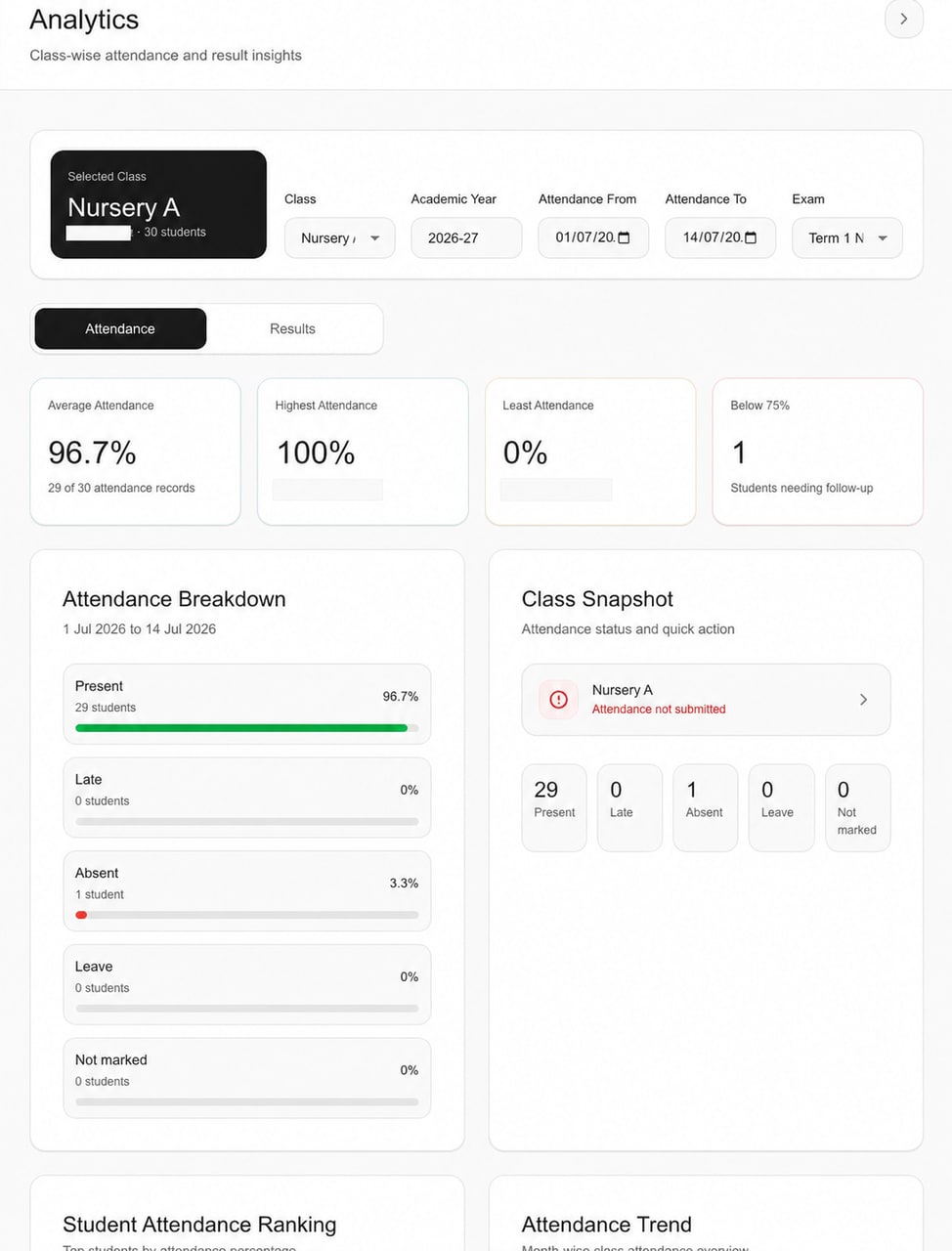
Existing publication-redacted interface. The displayed figures and “Attendance not submitted” state are retained; this is not a reconciled school report.
A summary, with its context
School analytics software turns maintained attendance and exam-result records into filtered operational summaries. In Schylva, authorised administrators choose a class and date range, or a class and selected exam, review the supported summary, and trace it back to the source record before school-led follow-up.
Use a selected class and attendance range or an available exam to examine the corresponding descriptive summary.
Open the relevant Attendance or Exams & Results workflow when the school needs to verify data or ownership.
Authorised staff apply the school's process; Schylva does not predict or automate the operational decision.
A school’s review desk
Start with what you need to understand. Expand a question to see the available summary, the maintained record and the school-led follow-up.
Select the class and a valid date range to review the supported attendance summary and status breakdown.
Use the relevant class and date context when the school needs to inspect attendance records or ownership.
Explore attendance managementReview the available highest, least and below-75% attendance cues together with the month-grouped class trend.
Treat the cues as a starting point for school review, not as risk scoring, prediction or an automated decision.
Explore attendance managementSelect an available exam for the class to review supported class-score and subject summaries. Class and student summaries require complete scored rows, while subject averages use each non-withheld scored entry.
Use the result view for operational context without treating it as a prediction, recommendation or configurable reporting layer.
Explore exams & resultsKeep the selected class, attendance period or exam in view and identify the school role responsible for the underlying record.
Resolve data questions in the attendance or exam workflow rather than treating the summary as a separate source of truth.
Prepare a representative reviewThese are explanations of the available workflow, not live analytics. Opening a question does not query or change school records.
Before reading the number
A summary is descriptive—not a decision about a student or a forecast of performance.
Read attended versus expected records with the selected class and date range. “Not marked” is a separate status; the below-75% cue is fixed, not a configurable risk rule.
Class and student summaries require complete scored rows. Subject averages use non-withheld scored entries; withheld rows are excluded from scored summaries.
Confirm that the intended records are maintained and who owns them. The screenshot does not establish refresh frequency, data freshness or calculation reconciliation.
Visibility and responsibility
Other roles maintain or receive relevant records without gaining the school analytics workspace described on this page.
Analytics access
An active administrator with the appropriate dashboard permission can use the supported attendance and result analytics view.
For school administratorsRelated records—not administrator analytics
Teachers use the relevant attendance or assessment responsibility available to their account; this page does not promise school analytics access for Teachers.
For teachersParents receive the supported attendance or published result information for the appropriately linked child, not the administrator analytics workspace.
For parentsStudents use the relevant personal attendance and published result views without access to school analytics.
For studentsSupporting source workflow
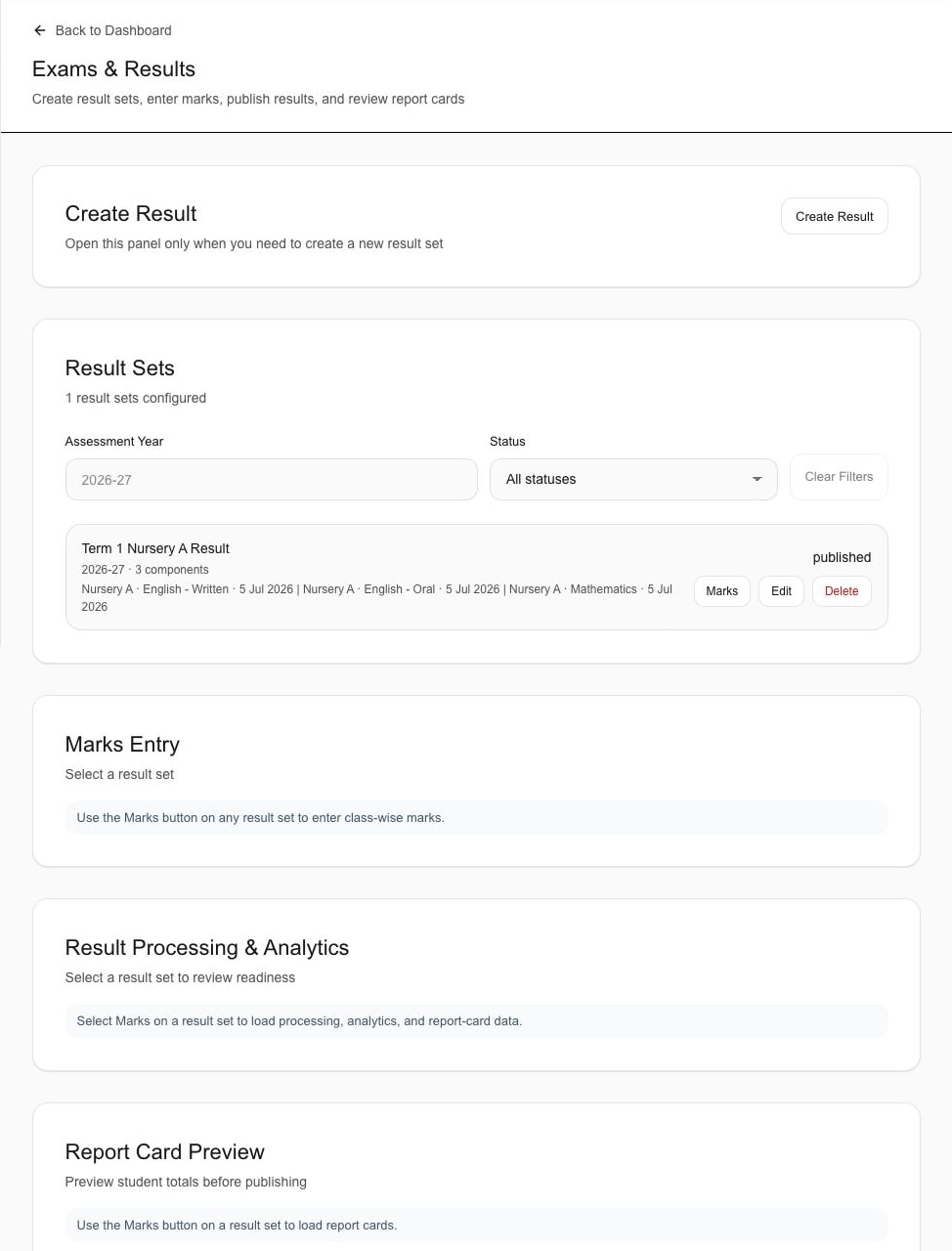
Exams & Results record context only. This is not the Analytics Results tab.
Know what the evidence shows
The supporting capture shows a sample result set, assessment year and published status in Exams & Results. Marks and readiness areas await a selected result set.
It does not verify result calculations, saved marks entry, reporting exports or prediction.
Return to the Attendance Analytics screenBoth images are unchanged, already-public focused derivatives. No local-only gallery captures have been added to the public asset set.
Scope without inference
Evaluate the available attendance and selected-exam summaries. Confirm extra reporting requirements in writing.
Not current capabilities
Prepare a representative review
Use fictional or redacted examples to verify that the available summaries, filters and role boundary fit the school's operating process.
Choose a representative date range and compare the available summary with its maintained attendance records.
Use a redacted or fictional exam with complete and incomplete records to confirm the current calculation boundary.
Map the current school responsibilities to the supported administrator permission and role-specific workflows.
A few useful answers
The current Analytics workspace is for active School Administrator accounts with the appropriate dashboard permission. It is not presented as a school-wide view for Teachers, Parents or Students.
An authorised administrator can select a class and valid date range to review the available attended-versus-expected average, status breakdown, student-level cues and month-grouped trend from maintained attendance records in that period.
For an available exam selected for the class, the current product can show class-score summaries for students with complete scored entries, entry completion and subject averages from maintained non-withheld scored entries. Withheld rows are excluded from scored summaries.
No. Fee structures, payment records and fee status belong to the separate Fee Management workflow and are outside this page's supported scope.
No. The current analytics are descriptive operational summaries. Schylva does not claim predictive risk scoring, AI recommendations, benchmarking or automated decisions.
Arbitrary custom dashboards, custom BI, configurable analytics rules, scheduled reports and CSV or PDF analytics exports are not current claims. Bring the exact reporting requirement to the demonstration for a written scope decision.
Analytics-focused next step
We will map four recurring questions—including representative attendance and selected-exam result questions—to the available summary, source record and operational owner.
Share only approximate student count and evaluation priorities—never production student names, attendance records, marks or screenshots. We respond within two working days.