School administrators
Prepare exams and schedules, maintain result records and publish through the available flow.
For administratorsSchool exam and result management
Prepare the exam. Maintain and check the records. Publish the result intended for the relevant Parent or Student account.
Authorised school users manage the workflow. Confirm Teacher permissions, your grading scale and report-card format during evaluation.
Inside the school workspace
Reviewed sample data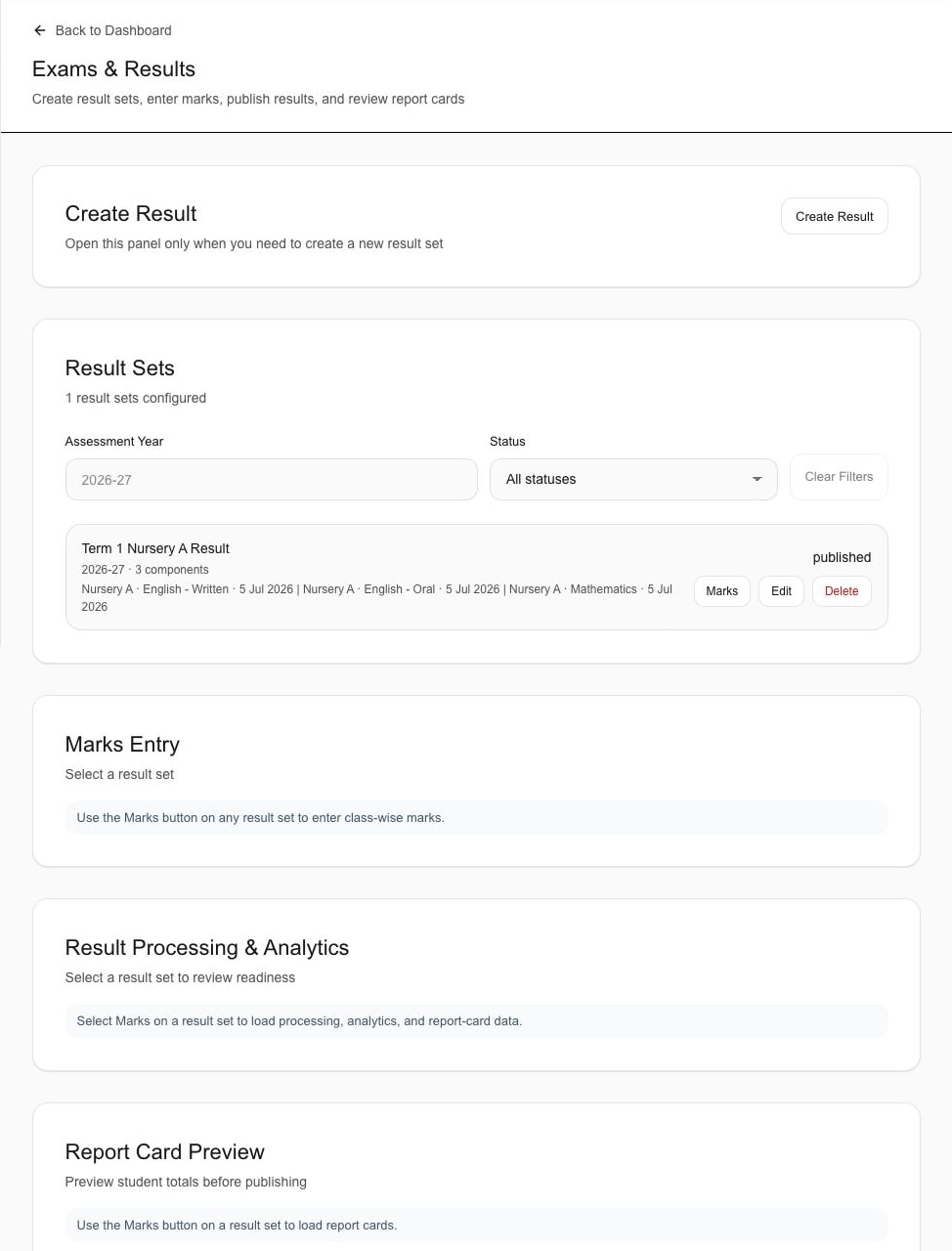
Published status is visible. Marks and readiness areas await a selected result set; this capture does not demonstrate saved entry or processing.
The important distinction
The exam connects preparation, maintained records and published access. The family view is not the school’s internal marks workspace.
The result release flow
Six supported steps, grouped around who is doing the work and when the result becomes available. Expand a step to inspect it.
School context
One academic context for the subjects and records that follow.
The school prepares the exam within its academic year, class and assessment context.
The exam becomes the shared reference for its subjects, marks and eventual published result.
The school associates the subjects or available assessment components required for the exam.
Marks and result records remain tied to the correct exam and subjects.
Internal school work
A readiness check—not moderation or multi-stage approval.
Authorised users maintain the available marks and result information.
The maintained records stay inside the selected result set.
The school checks the result set, marks and report-card context before publishing.
This is a readiness check, not moderation or multi-stage approval.
Relevant account access
Publishing changes access. It does not generate a report-card PDF.
Publishing makes the result available to the relevant Parent or Student account.
The release changes account access; PDF generation and publishing history are outside this claim.
The recipient opens the overall and subject-level result associated with that Student.
The account sees the published result rather than the school's internal marks-maintenance workspace.
Workflow explanation, not an interactive school record. No marks are entered or results published from this page.
Responsibility and access
Viewing a result does not grant marks-entry or publishing rights. Teacher permissions must be confirmed for the school’s configuration.
School-side responsibilities
Prepare exams and schedules, maintain result records and publish through the available flow.
For administratorsTeachers can have relevant exam visibility. Confirm their marks, review and publishing permissions for your configuration.
For teachersReadiness review is not a moderation or multi-stage approval claim.
Published account views
Parents can review the result published for the appropriately linked child.
For parentsStudents can review the overall and subject-level result published to their account.
For studentsEach view belongs to the appropriately linked child or Student account.
Published Student result · sample data
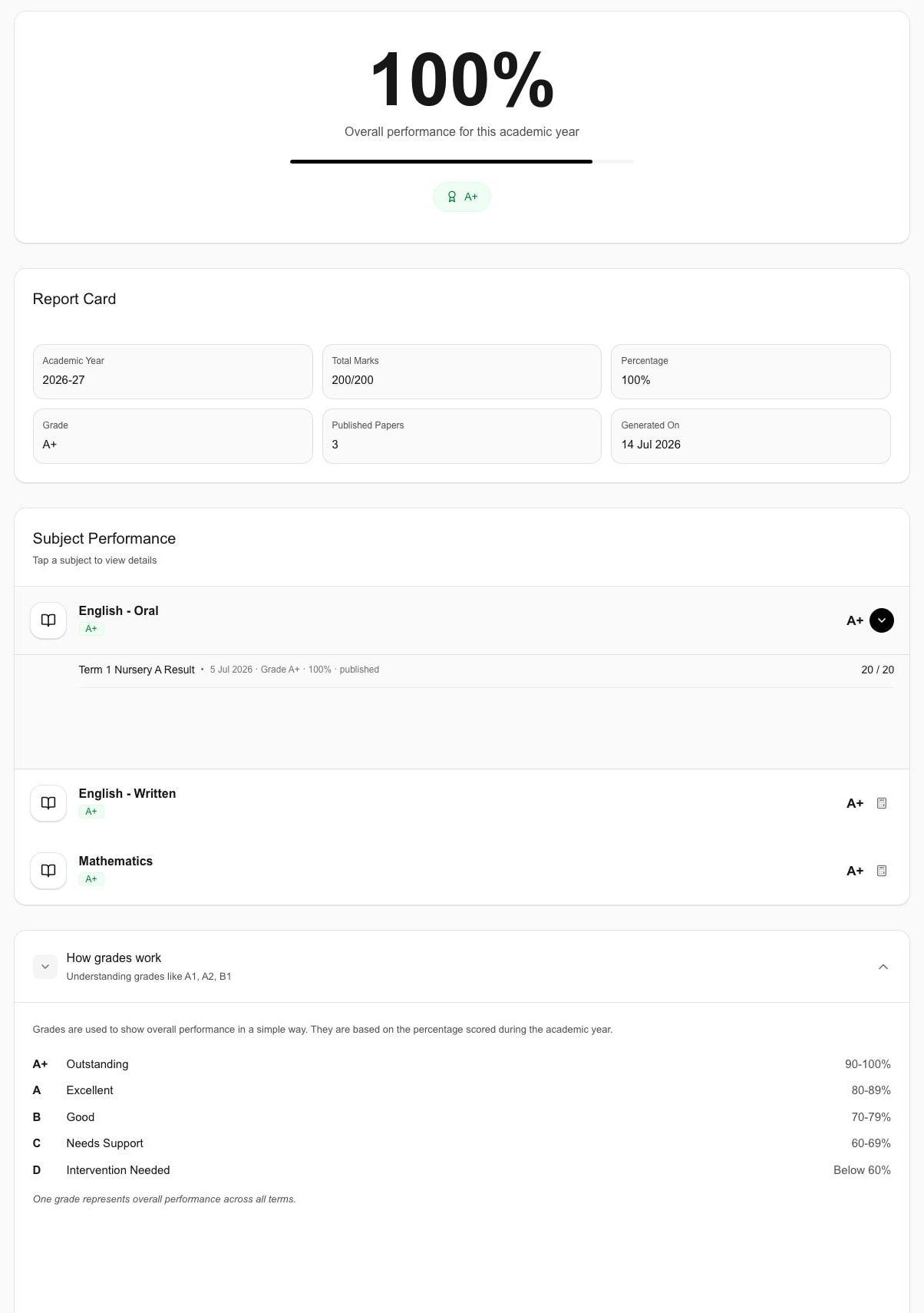
The displayed 100%, grade and totals are demo values—not customer outcomes, fixed limits or a promise of configurable grading.
The receiving side
The reviewed Student capture shows the published overall and subject-level result. It is not a Parent or Teacher result screen.
The academic year, grade, totals and overall percentage shown in the capture.
Published subjects and the expanded subject detail in this static sample.
The displayed scale explains this sample. Confirm your required grading scale and board-specific format in the walkthrough.
The Print control is excluded from this reviewed derivative. No downloadable report-card PDF generation is claimed.
Return to the school workspaceCurrent assessment scope
Confirm the school’s assessment context and report-card expectations before deciding. A visible control is not proof of every related capability.
Confirm for your school
Use a 45-minute walkthrough to confirm the academic context, authorised responsibilities, pre-publishing checks, available grading scale and board-specific format, and the information each account should receive.
Bring its academic year, term, subjects and assessment components.
Identify the authorised users and their pre-publishing checks.
Bring the grading scale, format expectation and a redacted Parent or Student example.
A few useful answers
Schylva supports exam setup and subject scheduling within the configured academic context. Bring one example to review its terms, subjects and assessment components.
Authorised school users can maintain marks and result records. Confirm Administrator or Teacher responsibility, review steps and permissions for your configuration.
Yes. The publishing flow can make the relevant result available to appropriately linked Parent and Student accounts.
Confirm the school's required grading scale and report-card format during evaluation and implementation. This preview does not claim arbitrary grading configuration or support for every board-specific format.
No. Downloadable report-card PDF generation is not a current claim. The focused Student evidence removes Print so it cannot be mistaken for proof of PDF output.
No. This page does not claim advanced moderation, multi-stage approval, advanced assessment components or detailed publishing history.
Exam-focused next step
Bring a sample exam, grading expectation and redacted result. We will trace the available workflow into the relevant Parent or Student view.
Share only your approximate student count and evaluation priorities—never production marks or Student records. We respond within two working days.