Schylva

Board fit for schools in India

School management software for CBSE, ICSE and State Board schools.

Schylva is a school management system for CBSE, ICSE and State Board schools that connects people, classes, attendance, fees, timetables, communication, exams and published results in one platform. Each school still needs its exact academic structure, grading scale, report-card format and role responsibilities confirmed during evaluation and configured before rollout.

There is no separate Schylva product edition for each board. School-specific configuration is still required; the board name alone does not prove fit.

Board readiness matrix

See what connects and what needs confirmation.

Use the school’s real structure and expected output to decide fit.

School structure

Academic year, classes, sections, subjects and linked records.

Board, grade range, calendar and class model.

The board name alone does not define the configuration.

Roles and access

Role-aware access for four school roles.

Who prepares, reviews, publishes and receives each record.

No arbitrary custom roles, SSO, SCIM or unrestricted permissions claim.

Attendance, fees and communication

Attendance, fee records, payments and circulars.

Operating rules, handoffs and payment path.

WhatsApp and non-login SMS are not school workflow-notification channels.

Timetables and academics

Timetables, subjects, homework and study materials.

Periods, subjects, timetable ownership and academic workflow.

No automatic timetable, curriculum delivery or full LMS claim.

Exams, marks and published results

Exams, schedules, marks, results and supported publishing.

Exam structure, components, checks and role responsibilities.

No advanced components, moderation, multi-stage approval or publishing-history claim.

Grading and report-card format

Configurable grading scales and board-specific report-card formats for CBSE, ICSE and State Board requirements.

Availability and setup of the exact scale and report-card format.

No arbitrary grading, every-format or report-card PDF claim.

Implementation and validation

Written plan, configuration, initial migration, training and validation.

Sources, owners, migration scope, checks and school approval.

No universal migration format, unlimited scope or one timeline.

Three evaluation contexts

Bring evidence behind the board name.

Each school still needs an exact demonstration and confirmed configuration.

CBSE

Demonstrate the CBSE assessment structure.

Confirm the academic year, grades, assessment pattern and expected result.

  • Current term or exam structure
  • Approved grading scale
  • A redacted report-card example

Decision checkpointValidate one exam-to-result workflow before rollout.

ICSE

Confirm assessment and reporting choices.

Demonstrate the intended subjects, assessment rules and result format.

  • Representative subjects and assessment structure
  • Approved grading or marks rules
  • A redacted expected result format

Decision checkpointRecord what works, needs configuration or remains unresolved.

State Board

Name the exact board and state.

State Board is not one universal academic model. Confirm the named board, grades, medium or language, rules and output.

  • Exact state and board name
  • Medium or language requirements
  • Rules and a redacted report-card example

Decision checkpointEvaluate the named school; do not infer every State Board format.

Assessment to published result

Follow one result through five stages.

The exact structure, grading scale and report-card format remain configuration decisions.

  1. Academic context

    Identify the academic context.

    Define the representative structure for evaluation.

    This does not claim curriculum delivery.

  2. Exam and schedule

    Prepare the exam and subject schedule.

    Connect the exam, subjects and schedule to the academic context.

    Confirm required assessment components.

  3. Marks and result

    Maintain marks and results.

    Keep marks and results with the selected exam and Student.

    No arbitrary grading or advanced-components claim.

  4. Review and publish

    Check and publish the result.

    Review the result before an authorised user publishes it.

    Readiness is not moderation, multi-stage approval or publishing history.

  5. Parent or Student view

    Open the published result.

    The linked Parent or relevant Student reviews the published result.

    Published does not imply report-card PDF generation.

Product evidence

Inspect the supported result path.

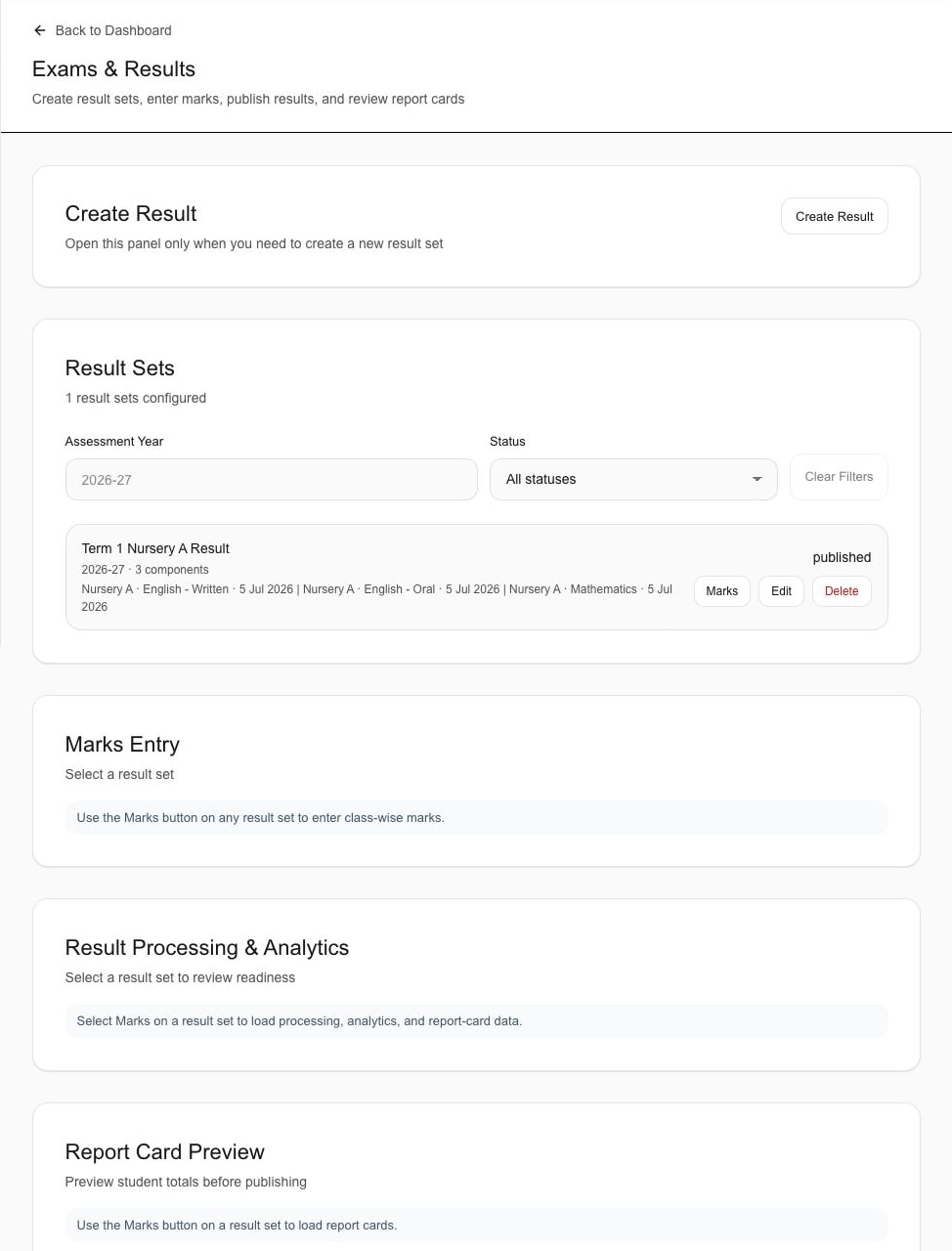
Focused sample screens show only the evidence described below.

Actual Schylva web product screen · publication-safe focused derivative · sample school data.
Focused Schylva administrator result overview showing sample exam context and published statusOpen administrator result overview screen

Reviewed product evidence

Administrator result overview

Sample result set, assessment year and published status.

This focused Administrator screen does not prove saved marks entry, grading configuration, support for every board format, analytics, PDF generation, moderation or publishing history.

Review exams and results evidence
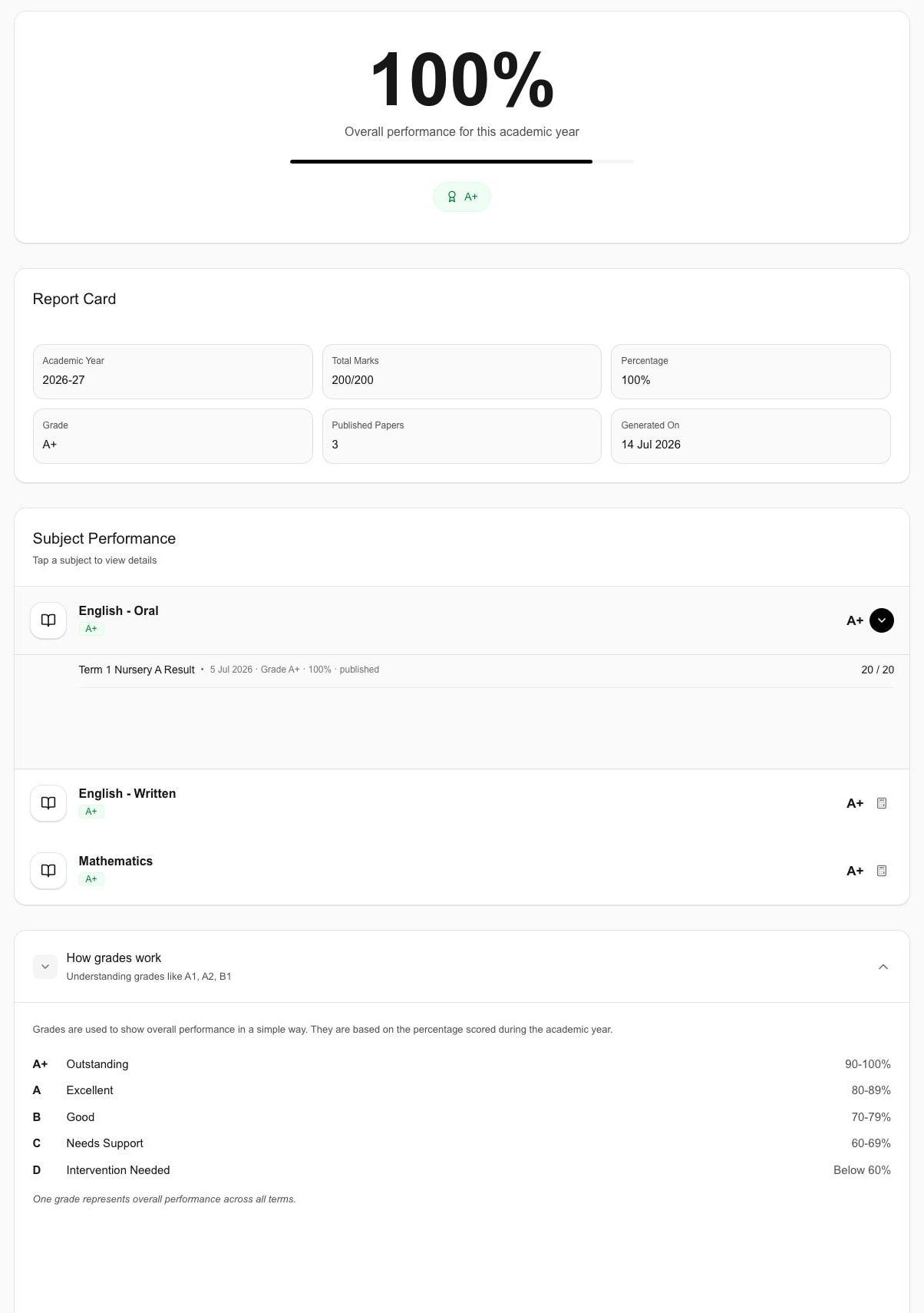
Actual Schylva web product screen · publication-safe focused derivative · sample school data.
Focused Schylva Student view showing a sample published result with totals, grade and subject-level informationOpen student published result screen

Reviewed product evidence

Student published result

Sample grade, totals and subject-level Student result.

This is not a Parent view and does not prove grading configuration, support for every board format, PDF generation, moderation or publishing history.

Review exams and results evidence

Supported, confirm, boundaries

Use three states to decide fit.

Keep support, confirmation and boundaries visible together.

Supported

Evidence available

  • Connected people, roles and operations
  • Supported exams, schedules, marks, results and publishing
  • Configurable grading scales and board-specific formats for these requirements
  • School-specific implementation and validation

Confirm for the school

School decision required

  • Exact year, class, subject and assessment structure
  • Required grading scale and report-card setup
  • Result-workflow role responsibilities
  • Relevant State Board, medium or language details
  • Migration inputs, checks and school approval

Current boundaries

Do not infer or promise

  • No board certification, affiliation, accreditation or legal-compliance claim
  • No promise of every board, State Board, language or report-card format
  • No downloadable report-card PDF, moderation, advanced assessment component or publishing-history claim
  • Screenshots do not prove final grading or report-card configuration

Configuration path

Turn a board label into a validated setup.

Use redacted inputs and explicit approval checkpoints.

  1. Identify

    Describe the academic structure.

    Name the board, year, grades, subjects, assessments, grading and report.

    Checkpoint: The requirement is understood consistently.

  2. Demonstrate

    Use one exam-to-result scenario.

    Record what works, needs configuration or remains unconfirmed.

    Checkpoint: Evidence is separated from proposed work.

  3. Configure

    Apply the agreed choices.

    Prepare the agreed structure, roles, grading and report-card context.

    Checkpoint: Representative records are ready for review.

  4. Validate

    Confirm with authorised owners.

    Review records and role handoffs before activation.

    Checkpoint: The school owns the final readiness decision.

Review Schylva implementation

Prepare a board-fit demonstration

Bring seven answers to the demo.

Use one representative academic scenario.

Use a fictional or redacted example. Do not share production Student records, personal data, login credentials, payment details or confidential school information through the public site.

Book a board-fit demo
  1. Exact boardWhich board, state and academic year apply?
  2. School structureWhich grades, classes, sections and subjects apply?
  3. Exam structureWhich exam, term, schedule and components apply?
  4. Grading scaleWhich marks, grade bands or pass rules apply?
  5. Report-card expectationWhat must staff and recipients see? Bring a redacted example.
  6. Role responsibilitiesWho prepares, reviews, publishes and receives results?
  7. School constraintsWhich language, device, connectivity, migration or timing constraints matter?

Board-fit questions

Keep the decision school-specific.

Confirm exact academic and reporting needs in a demonstration.

Does Schylva support CBSE, ICSE and State Board schools?

Schylva supports these contexts, configurable grading scales and board-specific formats. Confirm the exact structure, scale, format and roles during evaluation and implementation.

Does each board need a separate Schylva product edition?

No. One product connects common operations, but school-specific configuration is still required.

Can Schylva use our school’s exact grading scale?

Schylva supports configurable grading scales. Bring the approved scale to confirm setup; arbitrary grading logic is not promised.

Does Schylva support our exact report-card format?

Schylva supports board-specific formats. Confirm the exact format; not every format or downloadable report-card PDF is promised.

Is Schylva certified, affiliated or approved by these boards?

No certification, affiliation, accreditation, approval or legal-compliance claim is made. Board names describe evaluation context.

What does the current exam-to-result workflow support?

Supported scope covers exam setup, schedules, marks, results and publishing. It excludes advanced components, moderation, multi-stage approval, publishing history and report-card PDF generation.

Does State Board support include every state, language and format?

No universal claim is made. Name the state, board, language, rules and report-card expectation for evaluation.

What should our school bring to a board-fit demo?

Bring the board, structure, exam, grading scale, roles and a fictional or redacted report-card example. Do not share production Student or personal data.

Make the decision concrete

Bring the academic structure your school needs Schylva to support.

Separate demonstrated support, configuration and open questions.

Schylva targets a response to demo and custom-quote requests within two working days.