Schylva

School ERP access and login management

See how Schylva manages school access and login.

Follow the product paths your school can inspect: administrator-managed accounts, role-aware workspaces, configured login verification, selected audit visibility and controlled file routes.

  • Four school rolesAdministrator, teacher, parent and student experiences
  • Login verificationConfigured code step; SMS delivery is not currently available
  • Real product evidenceAccount and file workflows shown with sample school data

Request a review without sharing student records, login credentials, OTPs, payment details or confidential documents.

Real product evidence

Inspect access and file workflows in the product.

Start with current Schylva screens using sample school data. Expand each image, review the workflow and keep the stated limitation attached to the evidence.

Actual product screen · sample school data · expand to inspect
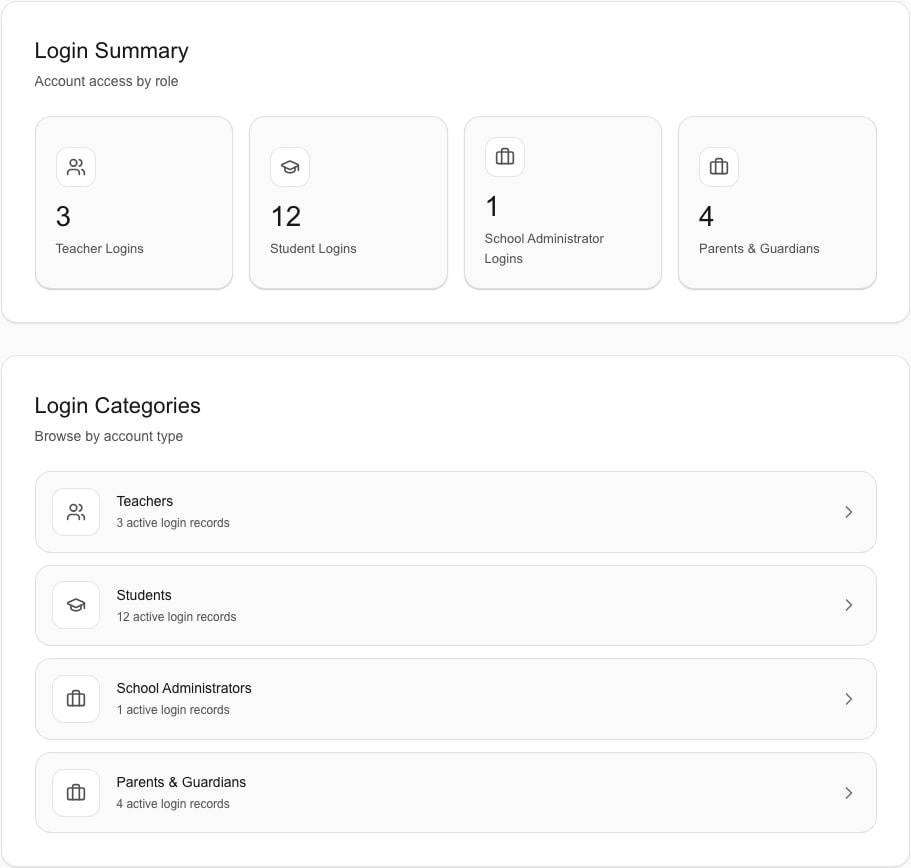
Administrator reviews Schylva login accounts by school role using sample school dataInspect screen
Role-account overview

Review school accounts by role.

The administrator workspace groups administrator, teacher, parent or guardian and student login records by role.

This screen demonstrates a product workflow; it is not evidence of infrastructure isolation or a breach-prevention guarantee.

Review user and access management
Actual product screen · sample school data · expand to inspect
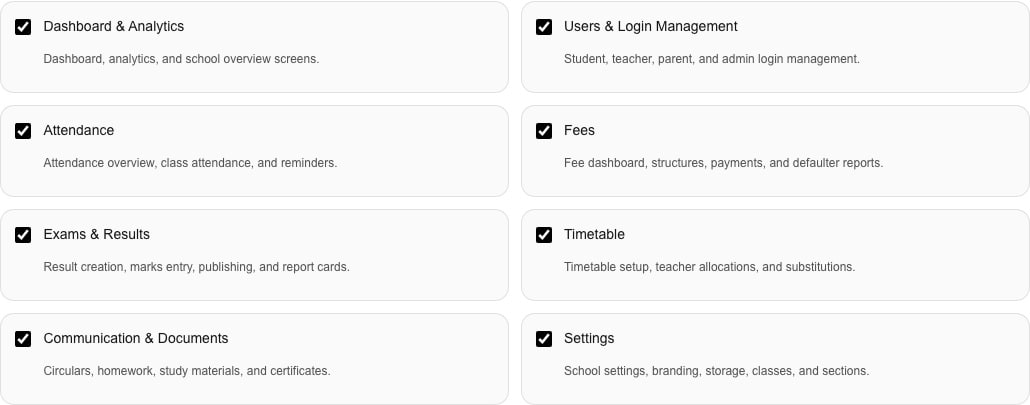
Administrator prepares a Schylva administrator account and reviews available permissions using sample school dataInspect screen
Administrator account preparation

Examine available administrator permissions.

The account preparation screen shows the administrator context and permissions available in the current product workflow.

Available permissions do not imply arbitrary custom RBAC, unlimited role creation or enterprise identity administration.

Understand available permissions
Actual product screen · sample school data · expand to inspect
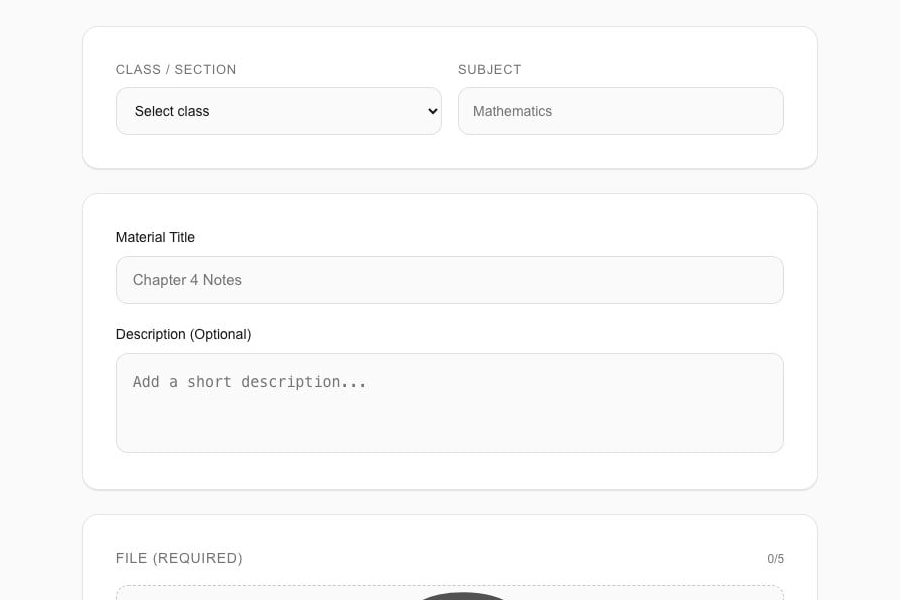
Teacher uploads a supported study material in Schylva using sample school dataInspect screen
File publication

Follow a teacher material path.

The teacher workflow shows how study material can be prepared for the relevant school audience.

This screen does not prove encryption, a storage quota, unlimited storage or support for every file type.

Review homework and study materials
Actual product screen · sample school data · expand to inspect
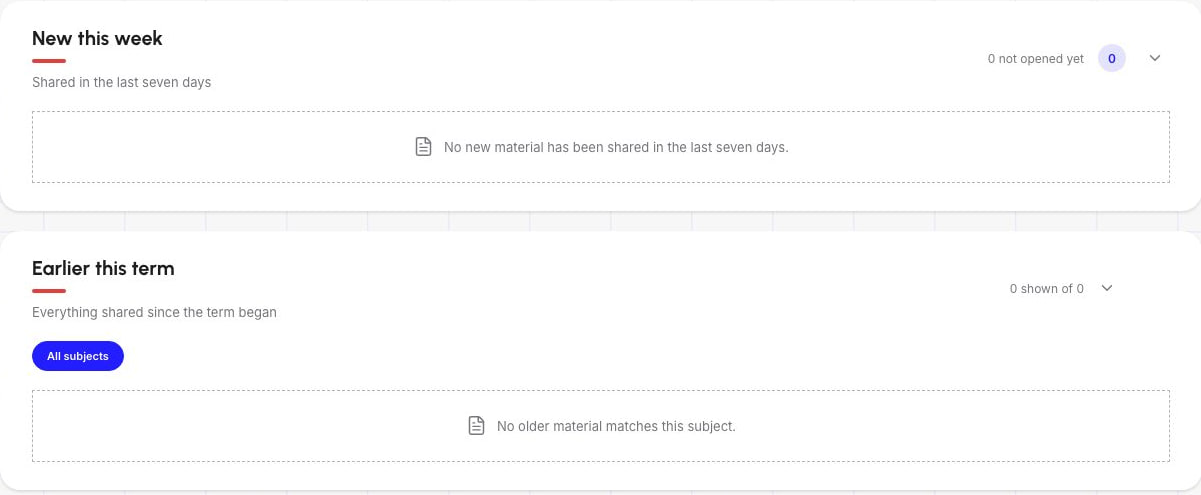
Parent reviews supported study materials for a linked child in Schylva using sample school dataInspect screen
Relevant recipient experience

Review the linked-family material path.

The parent experience shows study materials in the context of the relevant linked child.

This screen does not imply unrestricted or offline access, synchronisation of every resource or support for every file type.

Review the parent experience

Access, authentication and permissions

Follow access from the school account to the relevant record.

Review how a school relationship, account, configured login-verification step, role workspace and relevant record connect. Then test the path with representative users before activation.

Interactive access model

Inspect each layer and its current limit.

Configured school

Begin inside the configured school context.

Each school works in its configured Schylva environment, which provides the context for its accounts and workflows.

What your school can evaluate
Use representative users to check that they remain in the expected school experience.
What this does not imply
This does not imply absolute isolation or a breach-prevention guarantee.
School contextConfigured school

Configured school

Begin inside the configured school context.

Each school works in its configured Schylva environment, which provides the context for its accounts and workflows.

What your school can evaluate
Use representative users to check that they remain in the expected school experience.
What this does not imply
This does not imply absolute isolation or a breach-prevention guarantee.
AccountSchool account

School account

Connect an account to the right school relationship.

Administrators can create and maintain administrator, teacher, parent and student accounts and work with their account status.

What your school can evaluate
Review account creation, status changes and the expected relationship between the account and the school’s people records.
What this does not imply
Schylva is not presented as a universal identity-management platform.
Role workspaceRole-aware workspace

Role-aware workspace

Move into the experience appropriate to the school role.

Administrators, teachers, parents and students receive focused experiences shaped by their role and the available permissions.

What your school can evaluate
Check the menus, records and available work for representative users in each required role.
What this does not imply
This does not imply arbitrary custom roles, unlimited permission design or unrestricted access.
DestinationRelevant record

Relevant record

Reach the relevant class, child, person, workflow or file.

The role experience connects the user to the records and workflows relevant to that school relationship.

What your school can evaluate
Demonstrate representative role-to-record paths using privacy-safe sample school data.
What this does not imply
A relevant path does not give a user visibility into every school record.
Account journey

Prepare, authenticate and enter the right role experience.

  1. Prepare people and relationships

    Confirm who needs an account and how they relate to the school.

    Prepare administrator, teacher, parent and student records, including the relevant class, guardian and child relationships.

  2. Create or maintain the account

    Keep the school account connected to that context.

    Administrators can create and maintain role accounts within the configured school environment.

  3. Apply status and permissions

    Use account status and available administrator permissions.

    The administrator can work with account status and the permissions currently available in Schylva.

  4. Complete configured verification

    Use the current configured code step.

    The current verified web flow accepts a configured six-digit code. It does not generate or send that code by SMS.

  5. Enter the role workspace

    Continue in the appropriate administrator, teacher, parent or student experience.

    The account reaches its role-aware experience and the records relevant to that school relationship.

Operational evidence

Test audit visibility and file access.

Use representative actions and files to evaluate what can be reviewed today. Record any additional coverage, retention or file requirements for follow-up.

Selected audit visibility

Identify the actions your school needs to review.

Selected school and platform actions can be recorded for audit and review. Coverage and retention depend on the release and school agreement.

  • Confirm which actions matter to the school’s approval process
  • Identify who needs to review the available records
  • Record the applicable coverage and retention

Schylva does not publicly claim that every action is recorded, immutable or retained forever.

Ask in the demo: Which actions matter to our approval, and who needs to review them?

Review user and access management
File routes

Evaluate the path from teacher publication to the relevant role.

Study materials and other supported files use controlled product routes. Demonstrate the teacher-to-recipient path with a representative file.

  • Confirm the file types needed for the school’s launch scope
  • Follow the publication and recipient-access path
  • Record any required access or usage terms

Schylva does not publicly claim every file type, unlimited storage, end-to-end encryption or unrestricted offline access.

Ask in the demo: Can we follow one representative file from publication to the intended recipient?

Review homework and study materials

Security review and disclosure register

Separate what Schylva shows today from what still needs confirmation.

See what can be inspected in the product, what belongs in the school agreement and what still needs an approved answer.

Three publication states

These labels describe the current source of the answer—not a certification or guarantee.

Described publicly now

Product behaviour schools can inspect

Open a topic for the exact public boundary.

School context, roles and account controls

Each school works in its configured Schylva environment. Administrators, teachers, parents and students receive focused experiences, while account status and available administrator permissions help shape access.

Configured login verification

The current verified web flow accepts a configured six-digit code. Product-managed SMS delivery is not currently available.

Selected audit and file workflows

Selected school and platform actions can be recorded for review, while files use controlled product routes such as the available paths for study materials.

Confirmed in the school agreement

Product-data terms recorded for the school

Open a topic for the exact public boundary.

Export, retention and deletion

Applicable data-export, product-data retention and deletion terms are addressed in the school’s agreement.

Not publicly stated yet

Topics to bring into the security review

Open a topic for the exact public boundary.

Hosting region and encryption scope

A product-data hosting country or region and encryption scope in transit or at rest are not currently published. Product-data location cannot be inferred from the marketing website’s hosting.

Backup, recovery, uptime and service levels

Backup frequency, retention, restore testing, recovery targets, uptime percentages and service-level guarantees are not currently published.

Incident commitments

A public incident-response process, reporting contact or notification commitment is not currently published.

Certifications and blanket DPDP compliance

No security certification, certification logo or blanket Digital Personal Data Protection Act compliance claim is made on this website.

Security decision gate

Know what to demonstrate—and what to confirm.

Use these six questions to test the product and record every requirement that still needs an approved answer.

How open questions are resolved

Turn unresolved requirements into a recorded security review.

The Remonthub product team reviews requirements that are not answered by the product evidence or school agreement.

Review owner
Remonthub product team
Page reviewed
August 2026
  1. Send the requirement

    Use the security-review request to describe the decision your school needs to make.

  2. Review evidence and scope

    The product team separates demonstrable behaviour, agreement terms and technical details that are not yet published.

  3. Record the next step

    The school receives the available answer, the evidence to inspect or the confirmation needed before approval.

Request a security review We respond to demo and quote enquiries within two working days, excluding weekends and public holidays. This sales response is not a security-incident response time.

School security FAQs

Straight answers to questions schools ask.

Review the current product scope and note what your school still needs to confirm.

Does every user see the same information?

No. Each school works in its configured Schylva environment, and administrators, teachers, parents and students receive role-appropriate experiences. Test representative users against the records and workflows your school needs.

How do users sign in to Schylva?

The current verified web flow accepts a configured six-digit code before the account enters its school and role experience. Schylva does not currently generate or send that code by SMS.

Is SMS used for school updates?

No. WhatsApp and non-login SMS are not product channels. Login verification SMS delivery is not currently available; school updates use Schylva’s in-app and push notification experience at launch.

Does Schylva support SSO, SCIM or arbitrary custom roles?

Schylva does not currently claim SSO, SCIM, arbitrary custom roles, MFA or product-managed verification delivery. Administrators can work with the four school-role accounts, account status and available permissions.

What audit information is available?

Selected school and platform actions can be recorded for audit and review. Confirm the actions covered and applicable retention for your release and agreement; not every action is claimed to be immutable or retained forever.

Where is school product data hosted and how is it encrypted?

The website does not currently publish a product-data hosting country or region or encryption scope in transit or at rest. Do not infer product-data location from the marketing website’s hosting; bring the requirement into the security review.

Are backup and disaster-recovery guarantees published?

Not yet. Backup frequency, retention, restore testing and disaster-recovery targets remain unpublished. Bring any required terms into the security review.

Is Schylva certified under a security standard?

No current security certification or certification logo is claimed on this website. Evaluate a certification only with its verified scope, issuer, validity and supporting record.

How are data export, retention and deletion handled?

Applicable data-export, retention and deletion terms are addressed in the school’s agreement. Formats, self-service workflows and timelines are not currently published.

Does Schylva claim DPDP Act compliance?

No blanket Digital Personal Data Protection Act compliance claim is made on this website. Review the applicable responsibilities, notices and agreement terms for your school’s context.

What should a school confirm before activation?

Confirm account ownership, roles and relationships, permissions, login verification and delivery requirements, audit and file needs, plus any required export, retention, deletion, hosting, encryption, backup or incident terms.
Security review

Review Schylva against your school’s requirements.

Bring the roles, login path, audit needs, file workflows and agreement terms your school wants to confirm.