Plan the day
Find the schedule and school context that matter now.
Open the relevant timetable, calendar information and school updates prepared for the Student account.
For students and the school teams supporting them
Schylva gives students one focused web portal for their timetable, attendance, assignments, study materials, circulars, calendar, remarks and published results.
Each student opens the school records prepared for the signed-in account while administrators, teachers and parents keep separate responsibilities and access paths.
Share your school context and approximate student count. We target a response within two working days. Working days exclude weekends and public holidays.
Explore all four school rolesApproved school-day workflows inside the configured school account
Timetable, work, materials, updates and published records relevant to the signed-in Student
Complete approved Student role experience
Coming at launchApplicable in-app and push notification direction
Coming at launchLogin verification SMS delivery is not currently available; WhatsApp is not supported.
One focused school day
The school and class context stays connected behind the experience. The student starts from the relevant timetable, work, update or published record instead of navigating administrator or parent actions.
Plan the day
Open the relevant timetable, calendar information and school updates prepared for the Student account.
Find school work
Review supported assignments, hand in available work by 11:59 PM on the due date in the school's configured timezone, or during a per-student window reopened by the class Teacher for an overdue active assignment, and open study materials through the controlled access path. This is not a full LMS or collaborative assignment workspace.
Review the record
Review supported attendance, remarks and published results relevant to the account.
The Student study desk
The timetable, work and records serve different questions. Explore each without losing the school source or the limits of the available action.
01 · Plan the day
Your timetable is a view of the school’s schedule—not another timetable to maintain.
See the timetable screenshotWhat the Student does
Open the timetable made available to the signed-in Student account and review the relevant day or week.
02 · Find school work
What the Student does
Review the supported assignment or study material made available to the Student account. When hand-in is available, upload 1–5 PDF, JPG or PNG files up to 10 MB each by 11:59 PM on the due date in the school's configured timezone, or during a per-student window reopened by the class Teacher for an overdue active assignment.
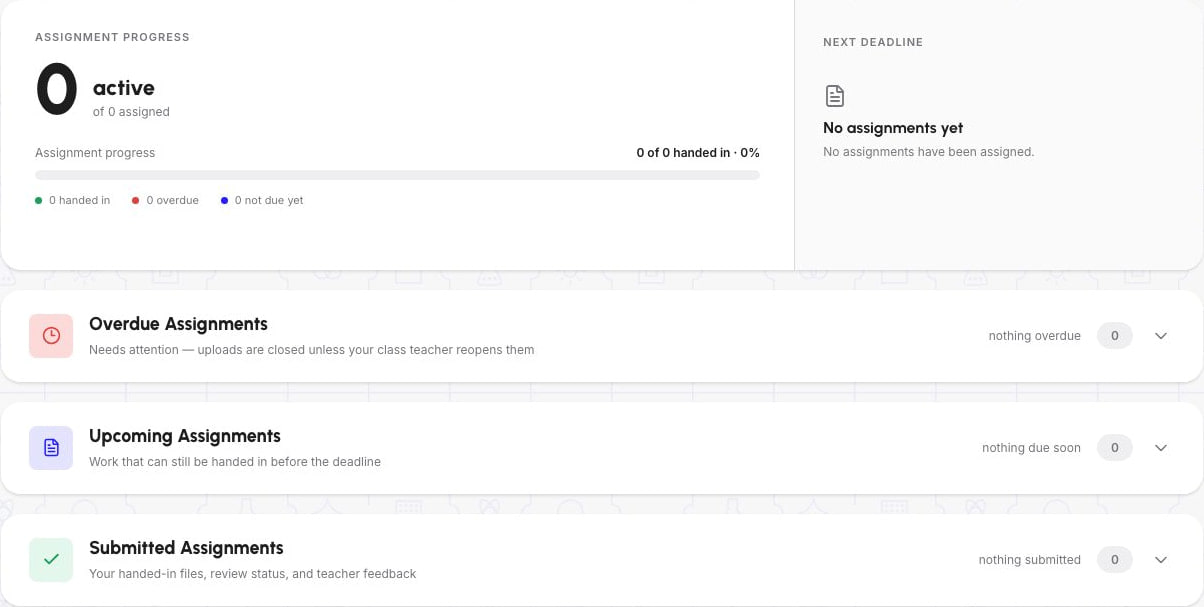
Reviewed fictional school data · static responsive-web screenshot, not a native app.
This is an empty assignment state: zero assigned, zero handed in, nothing overdue or submitted. It does not demonstrate a published assignment, upload, successful hand-in, returned work or Teacher review.
03 · Review the record
Attendance
What the Student does
Review the supported attendance information made available through the signed-in Student account.
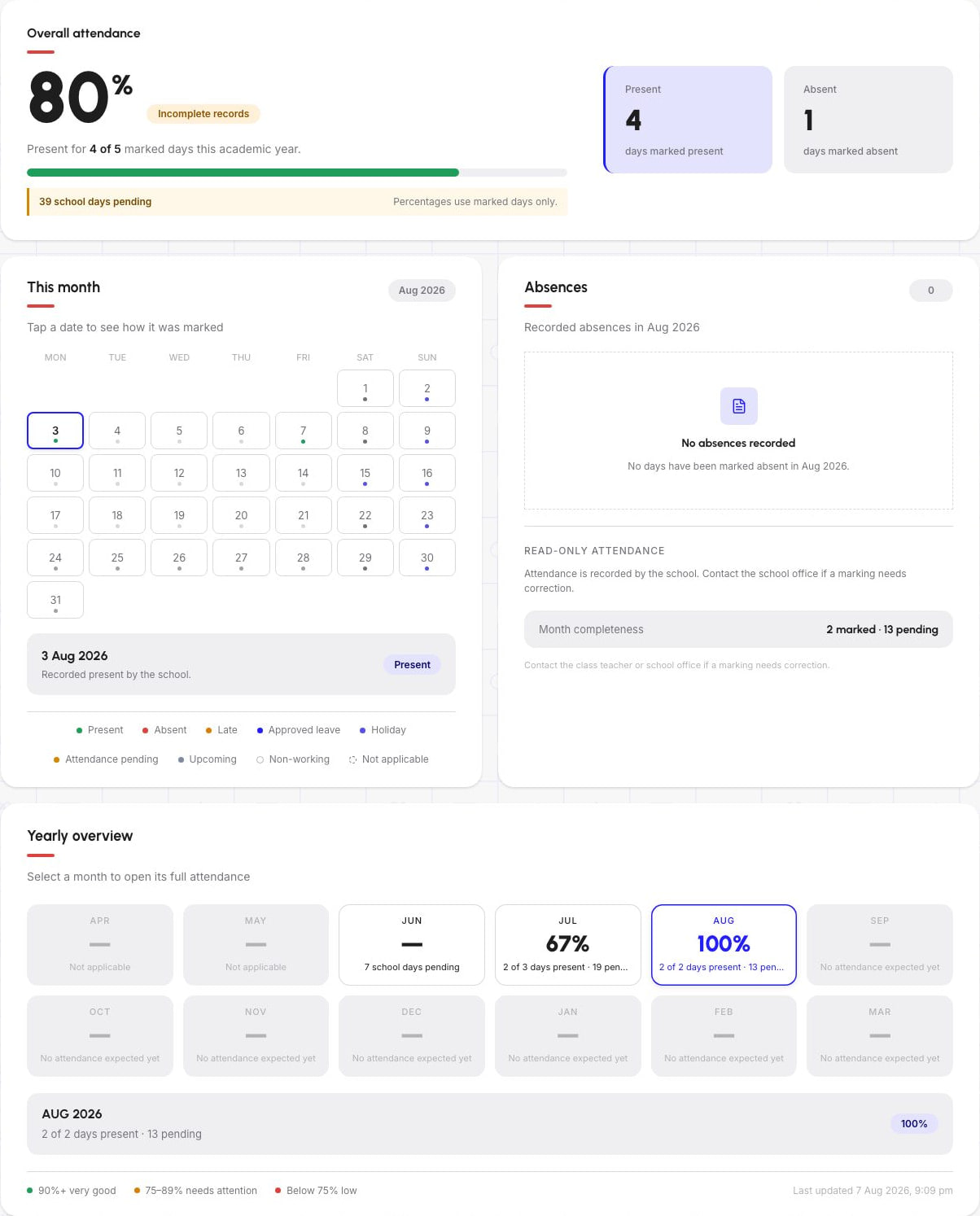
Reviewed fictional school data · static responsive-web screenshot, not a native app.
Incomplete records: 4 of 5 marked days, with 39 school days pending. The 80% headline uses marked days only. August has 2 of 2 days present and 13 pending; its 100% is a different, month-level denominator—not full attendance completeness.
Published results
What the Student does
Open the published result and review the available exam outcome and subject-level detail.
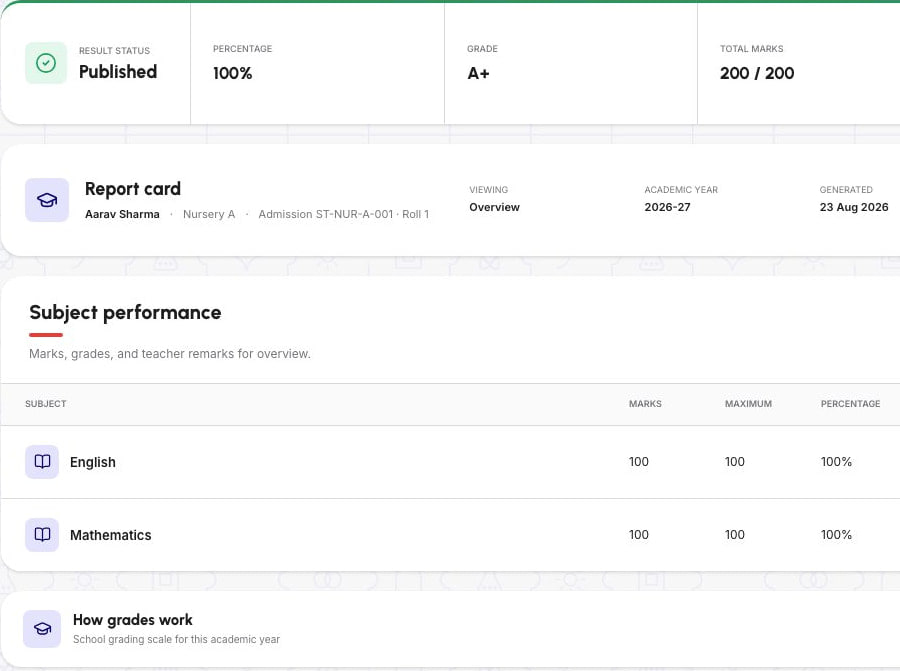
Reviewed fictional school data · static responsive-web screenshot, not a native app.
Published sample result: 200/200 across two subjects. These fictional marks are not a learning-outcome claim or a promise of results. The Report card label does not demonstrate a downloadable PDF or publishing history.
Four independent historical screenshots, not a matched school day, student record or end-to-end transaction. All product controls inside the images are static. Updated, internally consistent school-day evidence is required before release.
One school source, separate role experiences
Administrators and teachers prepare the appropriate school records. The configured Student account determines the focused information made available to that role, while parents use a separate family relationship and action set.
School operations
Prepare Student accounts, school structure, timetables, exams and circulars. Transport assignments remain a separate administrator workflow and are not delivered here.
Review school administration workflowsClass workflow
Complete supported attendance, homework, study-material and Student-remark workflows in the appropriate class context.
Review the Teacher experienceFocused school-day view
Open the relevant schedule, work, material, update, attendance information and published school record.
Current, launch and outside scope
Keep the current web experience separate from native-app launch commitments and capabilities that are not included.
Today
Planned
Not included today
Student rollout
Student adoption depends on configured accounts, classes, sections, schedules and representative school records—not on asking students to discover an empty or unprepared portal.
Prepare supported Student accounts, class and section relationships, the academic year, timetable context and relevant school settings.
Initial migration and staff training are included. The method, records, validation responsibilities, timing and training arrangement are confirmed in writing for the school.
Use sample or privacy-safe data to review one timetable, one assignment or material, one school update and one attendance or published-result record.
Support is included Monday to Friday, 10:00 AM to 6:00 PM IST, excluding public holidays. Schylva targets resolution within 24–48 working hours, except where progress depends on third-party services, school information or action, or circumstances outside Schylva’s reasonable control.
Support resolution is a target, not a guarantee; school and third-party dependencies may require additional time.
Student apps · Coming at launch
The apps are not currently available to download. At launch, the approved Student workflows will use mobile-appropriate controls and applicable notifications that return students to the underlying school record.
Questions students and school teams ask
Access, assignments, school responsibilities and what is available today.
The school prepares the supported Student account and access path. The signed-in Student can review the relevant dashboard, attendance, assignments, remarks, circulars, calendar, timetable, published results and study materials made available in that school context.
Yes. Students can review supported assignments and open or download supported study materials made available to the appropriate class and account. Every file type, unlimited storage and universal offline access are not current claims.
Yes. A signed-in Student can hand in an available assignment by 11:59 PM on the due date in the school's configured timezone, or during a per-student window reopened by the class Teacher for an overdue active assignment, using 1–5 PDF, JPG or PNG files up to 10 MB each. The Student can then see its submission or review status, required Teacher feedback when work is returned for changes, and any optional 0–100 percentage score on reviewed work.
No. Student fee payment is not part of the current Student experience. The supported configured online payment journey is Parent-facing.
The Student experience focuses on the signed-in student’s own school-day information and published records. The Parent experience uses the appropriate family relationship, can move between linked children and includes separate supported family actions such as configured fee payment.
No. Private Teacher–Student chat and WhatsApp are not current product claims. Login verification SMS delivery is not currently available. Applicable in-app and push notification direction is Coming at launch; email delivery and non-login notification SMS are not supported.
No. The current Student workflow does not provide transport route or assignment information, live GPS, maps, vehicle movement, ETA or route history. Transport records are maintained in the authorised administrator workflow.
Yes. Schylva supports school workflows across CBSE, ICSE and State Board contexts. The school configures the applicable academic structure, grading scale and supported board-specific report-card format before the appropriate published outcome reaches the Student account.
Both complete Student role experiences are Coming at launch. They must not be described as downloadable until the production listings and device validation are complete.
Initial migration and staff training are included, with the method, records, responsibilities and timing confirmed for the school. Ongoing product support is included Monday to Friday, 10:00 AM to 6:00 PM IST, excluding public holidays. Schylva targets resolution within 24–48 working hours, except where progress depends on third-party services, school information or action, or circumstances outside Schylva’s reasonable control. Pricing is based on Student count and confirmed in a written school-specific quote.
Student-workflow demonstration
Bring the types of timetable, assignment or material, school update and published record students need to review. We’ll use sample or privacy-safe data to trace the school source into the focused Student experience and confirm every current boundary.
Use fictional or redacted examples—not real Student records, assignment files, credentials or confidential school data. Quote response targeted within two working days, excluding weekends and public holidays.