Schylva

For school owners, principals and administrators

School administration software for one connected school day.

Give school owners, principals and authorised administrators one connected view of the people and records behind each school day. Review attendance, fees, timetables, exams, communication, transport and access while each role sees only what it needs.

School-specific quote response targeted within two working days, excluding weekends and public holidays.

Explore the complete school platform
Web workflow · expand to inspect
Schylva administrator dashboard showing a school operational overview with sample school dataInspect product screen
Actual Schylva web product screen · sample school data.See the school-wide operational picture.

Use the administrator overview to spot the record or workflow that needs attention.

Review school analytics

Administrator overview

See the school-wide picture. Open the record that needs action.

Bring people, classes, schedules, payments, results and communication into one administrator workspace. Teachers, parents and students keep their own focused views.

School foundation

Students, guardians, teachers, classes, sections, academic year and settings.

Daily operations

Attendance, timetable, holidays and supported transport routes or assignments.

Fees

Structures, status, offline payment records and configured parent payment.

Academics and results

Exams, marks, supported publishing, configurable grading scales and board-specific report-card formats.

Communication and oversight

Targeted circulars, acknowledgements, relevant analytics, account status and available permissions.

Five administrator workflows

See how five common school tasks move from signal to outcome.

Choose a task to see what needs attention, what the administrator does, who receives the result and what is not included today.

Attendance decisionReview attendanceClose workflow

What needs attention
A class has not completed attendance or an attendance question needs review.
What the administrator does
Open the class and date view to review the attendance record.
Who receives the result
The teacher completes the class record; the appropriate parent or student view reflects that record.
Not included today

Schylva does not currently claim staff attendance or a correction and approval workflow.

Web workflow · expand to inspect
Schylva administrator reviews class attendance and result context using sample school dataInspect product screen
Actual Schylva web product screen · sample school data.Move from a school signal into attendance detail.

Review class, date and result information using sample school data.

Review attendance management

Fee decisionFollow up feesInspect workflow

What needs attention
The school needs to review a fee structure, student fee status or payment record.
What the administrator does
Review the fee structure, student status, offline payment record or configured parent payment.
Who receives the result
The appropriate parent can review fee history and use the school’s configured payment path.
Not included today

Payment-gateway transaction charges remain payable by the school. Schylva does not claim full accounting, a general ledger, refunds or every payment gateway.

Web workflow · expand to inspect
Schylva administrator reviews a supported school fee structure using sample school dataInspect product screen
Actual Schylva web product screen · sample school data.Review the school’s fee structure and payment status.

Inspect fee details without presenting Schylva as a full accounting system.

Review fee management

Schedule decisionCoordinate schedulesInspect workflow

What needs attention
A class or teacher schedule needs review or an available substitution must be managed.
What the administrator does
Review the class or teacher timetable and available substitutions.
Who receives the result
Teachers, parents and students receive the published schedule relevant to them.
Not included today

Schylva does not currently claim automatic timetable generation or advanced room optimisation.

Web workflow · expand to inspect
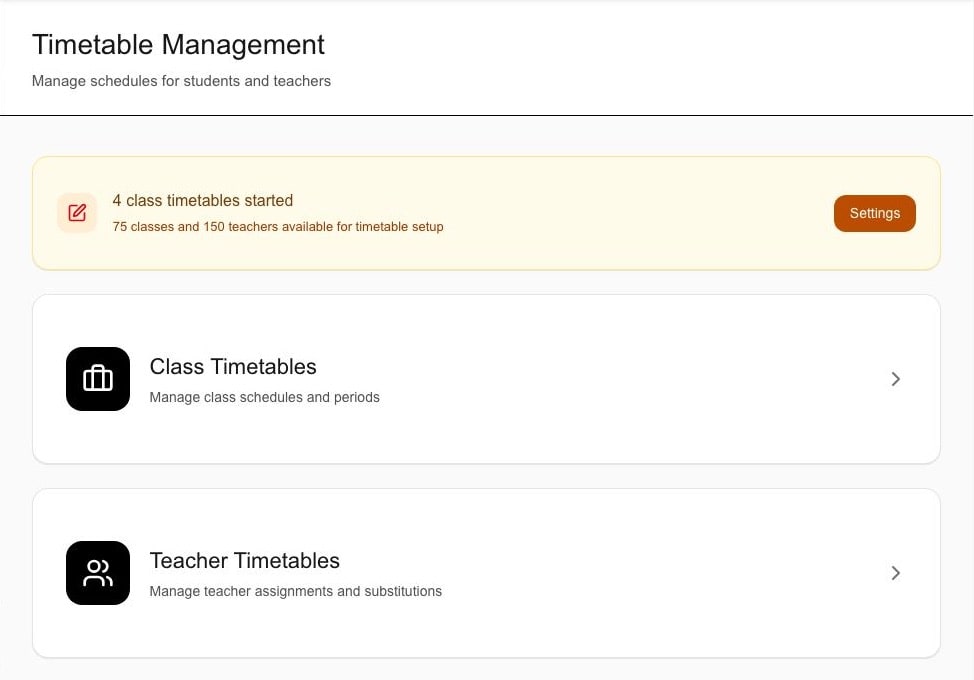
Schylva administrator reviews class and teacher timetables using sample school dataInspect product screen
Actual Schylva web product screen · sample school data.Coordinate the class and teacher timetable.

Review the timetable before the published schedule reaches each role.

Review timetable management

Communication decisionPublish a circularInspect workflow

What needs attention
The school needs to send a targeted operational update.
What the administrator does
Choose the circular, audience and available attachment.
Who receives the result
The selected teachers, parents or students receive the in-product circular and acknowledgement path.
Not included today

WhatsApp and non-login SMS are not supported. Applicable app and push notification delivery is Coming at launch.

Web workflow · expand to inspect
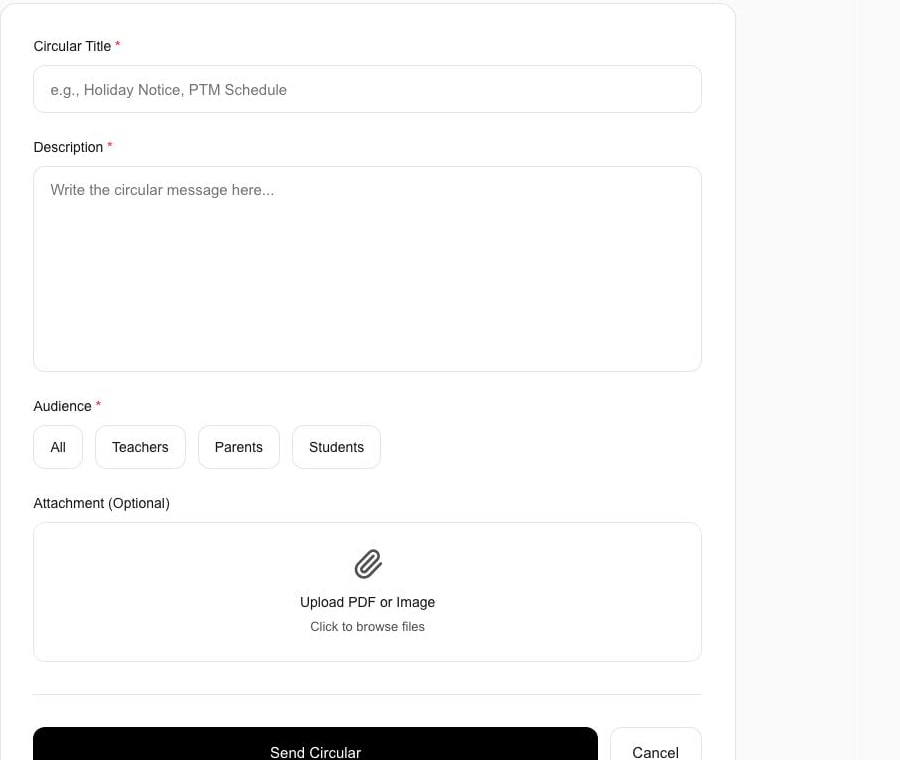
Schylva administrator creates a targeted school circular using sample school dataInspect product screen
Actual Schylva web product screen · sample school data.Prepare a circular for the appropriate school audience.

Create the in-product circular without implying unsupported messaging channels.

Review school communication

Access decisionPrepare role accessInspect workflow

What needs attention
A school user needs the appropriate account and role experience.
What the administrator does
Review administrator, teacher, parent and student account status and available permissions.
Who receives the result
The person enters the school-scoped workspace for their role and relationship.
Not included today

Schylva does not currently claim SSO, SCIM, arbitrary custom RBAC or unrestricted access.

Web workflow · expand to inspect
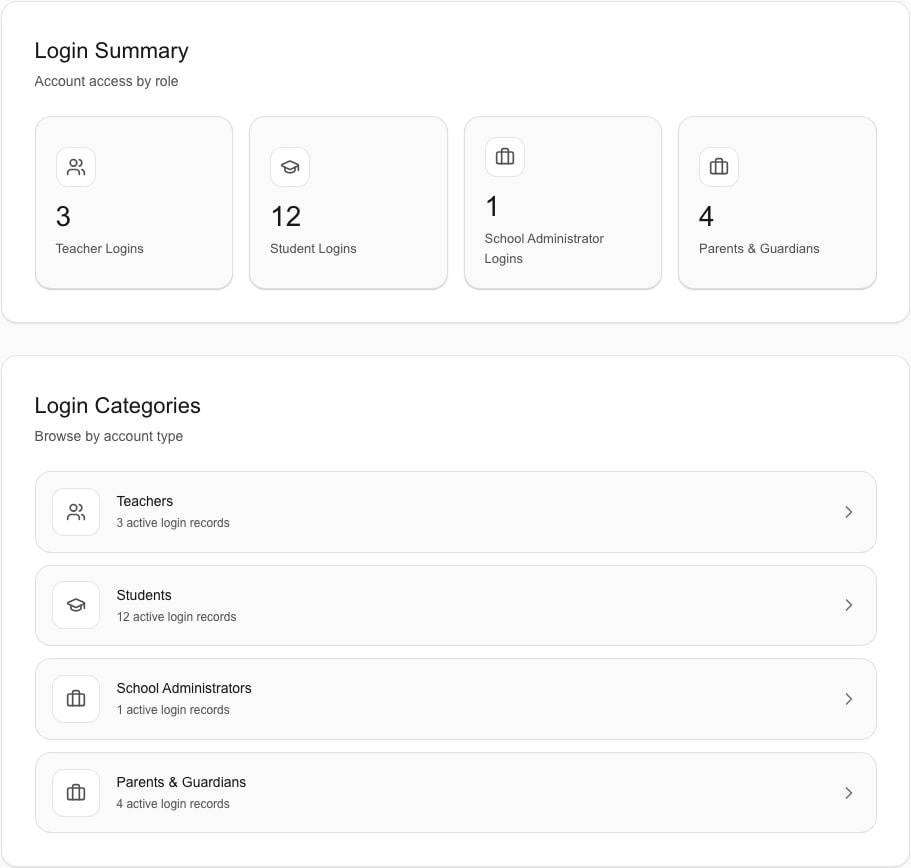
Schylva administrator reviews school login accounts by role using sample school dataInspect product screen
Actual Schylva web product screen · sample school data.Prepare the school-role account.

Review account status and the available role permissions without implying unrestricted permission design.

Review user and access management

Connected school roles

Coordinate the school. Keep every role focused.

The same configured school record connects administrator work with the relevant teacher, parent or student view.

School operations

School administrators

Coordinate school records, settings and role handoffs.

Product scope

See what is available, what comes at launch and what stays separate.

Use these three states to compare Schylva with your school’s requirements.

Available now on web

  • Administrator dashboard and relevant operational summaries
  • People, classes, sections, guardian relationships and school settings
  • Supported account status and available role permissions
  • Attendance, fee, timetable, substitution, exam and result, circular, holiday and transport workflows
  • Board-specific report-card formats and configurable grading scales
  • Relevant school analytics and role-to-record connections

Coming at launch

  • Complete administrator iOS and Android experience
  • Applicable in-app and push notifications for supported school workflows

Separate or not currently available

  • Admissions and enquiry CRM, library, payroll, inventory, hostel and full accounting or general ledger
  • Live GPS, vehicles, stops, ETA and trip history
  • SSO, SCIM, arbitrary custom roles and unrestricted permission design
  • Unsupported custom development, unfinished roadmap modules and unverified infrastructure or compliance promises

Board and reporting fit

Confirm your school’s academic and reporting setup.

Schylva supports configuration for CBSE, ICSE and State Board schools, including board-specific report-card formats and configurable grading scales. We confirm the school’s exact academic structure and reporting rules during implementation.

Review board and academic fit

Implementation and pricing

Confirm rollout, support and commercial details before activation.

The school-specific written plan records migration, training, timing and responsibilities. Public pages explain the current scope, support and commercial terms.

Initial setup

Standard onboarding and initial school configuration are included.

Migration and training

Initial data migration and staff training are included. The written plan confirms the records, method, validation, timing and training arrangement.

Ongoing support

Ongoing product support is included. Support operates Monday–Friday, 10:00 AM–6:00 PM IST, excluding public holidays, with a target of resolving product issues within 24–48 working hours. Third-party, school-dependency or outside-control circumstances may require additional time.
Commercial basis

Pricing is based on student count. We target a school-specific quote response within two working days, excluding weekends and public holidays.

Administrator mobile apps

The complete administrator app is Coming at launch on iOS and Android.

The complete Schylva administrator experience is planned for both platforms at launch. The apps are not available to download yet.

Review the complete four-role mobile launch scope
iOSComing at launch
AndroidComing at launch
  • No active App Store or Google Play links yet
  • Applicable in-app and push notifications will carry supported school updates
  • Login verification SMS delivery is not currently available
  • WhatsApp and non-login SMS are not supported
  • Device controls still apply; optional in-product notification-category controls are not available at launch
  • Push delivery cannot be guaranteed by the device or platform

Questions administrators ask

Get direct answers before you evaluate Schylva.

Review product scope, board fit, rollout, mobile availability, pricing and support—including what is not available today.

What can school administrators manage in Schylva?

Administrators can evaluate the approved school dashboard, people and class setup, account status and available permissions, attendance, fees, timetables and substitutions, exams and results, circulars, holidays, transport routes or assignments, and relevant analytics. Exact school configuration is confirmed during implementation.

Is Schylva suitable for CBSE, ICSE and State Board schools?

Yes. Schylva supports school configuration across CBSE, ICSE and State Board contexts, including board-specific report-card formats and configurable grading scales. The school’s exact academic structure and reporting rules are reviewed during implementation.

Can administrators control what teachers, parents and students see?

Administrators can work with supported role accounts, account status and available permissions. Each user reaches the appropriate school, role and relationship context. Schylva does not claim arbitrary custom roles or unrestricted permission design.

Does Schylva replace accounting, payroll, admissions CRM, library or inventory software?

No. Full accounting or general ledger, payroll, admissions CRM, library and inventory are not current Schylva product claims. Schools should identify any mandatory adjacent system during evaluation.

Will Schylva migrate our data and train staff?

Yes. Initial data migration and staff training are included. Formats, method, records, validation, timing and training arrangement are confirmed in the school’s written implementation scope.

When will the administrator iOS and Android apps be available?

The complete approved administrator experience on both iOS and Android is Coming at launch. Store links will be added only after the production listings are verified.

Does Schylva use WhatsApp or SMS for school updates?

No. WhatsApp and non-login SMS are not supported. Login verification SMS delivery is not currently available. Applicable school updates use in-app and push notifications at launch.

How is pricing calculated?

Pricing is based on student count and confirmed in a school-specific written quote. A custom quote response is targeted within two working days; payment-gateway transaction charges remain separate.

What ongoing support do administrators receive?

Ongoing product support is included. Support operates Monday–Friday, 10:00 AM–6:00 PM IST, excluding public holidays, with a target of resolving product issues within 24–48 working hours. Third-party, school-dependency or outside-control circumstances may require additional time.
Prepare your administrator demo

See your school’s priority workflows in Schylva.

Bring two priority workflows and one dashboard question. We’ll show the relevant records, role handoffs and current limits.