Administration
Student information, people, classes, school settings and user permissions form the shared school record.
Explore administrationSCHOOL MANAGEMENT, WITH PEOPLE AT THE CENTRE
School management software for attendance, fees, academics and communication. One connected workspace.
45-minute walkthrough · Reply within two working days
Attendance, assignments and circulars in a focused student view.
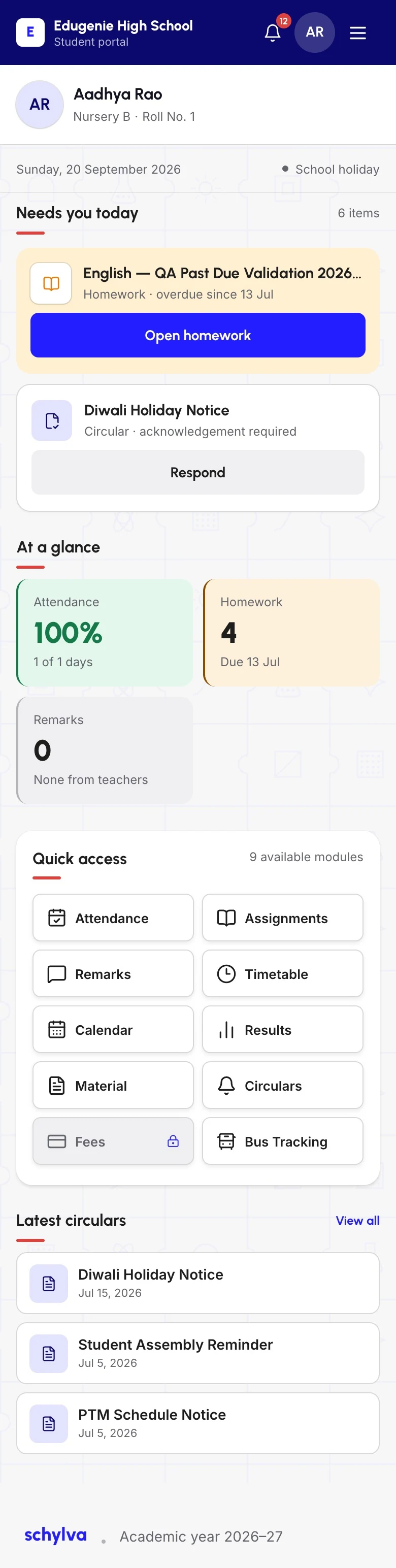
Full desktop-web capture with approved demo data. Scroll the image or open it larger.Mobile web, not a native app. Scroll to inspect the full captured page.
THE PRODUCT, UP CLOSE
Less chasing. More school.
Explore connected records and role-specific views.
Timetables, homework, study materials, examinations and published results belong in a connected school day—not in a trail of separate conversations.
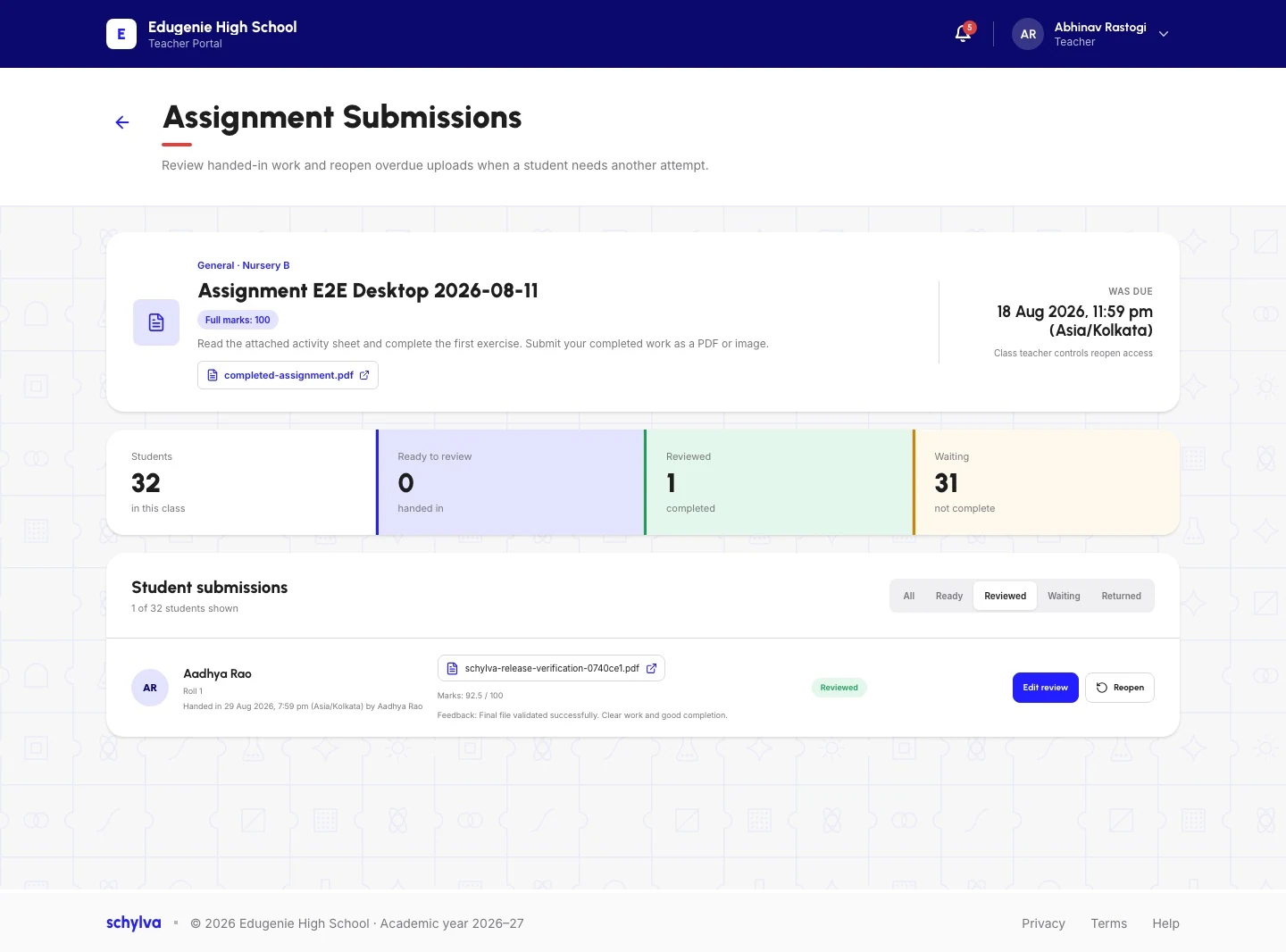
Shown: Teacher assignment review with submission totals, marks and feedback. Original sample QA text and review state are retained.
Preview switching needs JavaScript. Read all feature guides.
Screenshots show approved demo data from the web application. Pending captures are labelled. Confirm current web availability and school-specific scope during your walkthrough.
AND THE WORK AROUND THE CLASSROOM
Student information, people, classes, school settings and user permissions form the shared school record.
Explore administrationConnect transport routes, capacity, student assignments and transport fee settings in the authorised administrator workflow.
Explore transport managementReview school summaries, attendance analysis, results analysis and fee status from the authorised administrator view.
Explore school analyticsTransport scope: administrator records only. Parent and student transport delivery, live GPS tracking and fleet operations are outside the current scope.
Explore all eleven capability areasFOUR PERSPECTIVES. ONE SCHOOL.
THE BIG PICTURE
Review attendance, fees, academics, people and operations in one authorised school view.
THE EVERYDAY RHYTHM
Keep attendance, timetables, homework, study materials and school records in class context.
THE CONNECTION HOME
See attendance, fees, results and circulars linked to each child.
THE NEXT CHAPTER
Find timetables, assignments, study materials, exams and published results.
SCHOOL DOESN’T STAY AT A DESK
From a full school overview to a quick check between lessons. The web experience adapts to the screen in front of you.
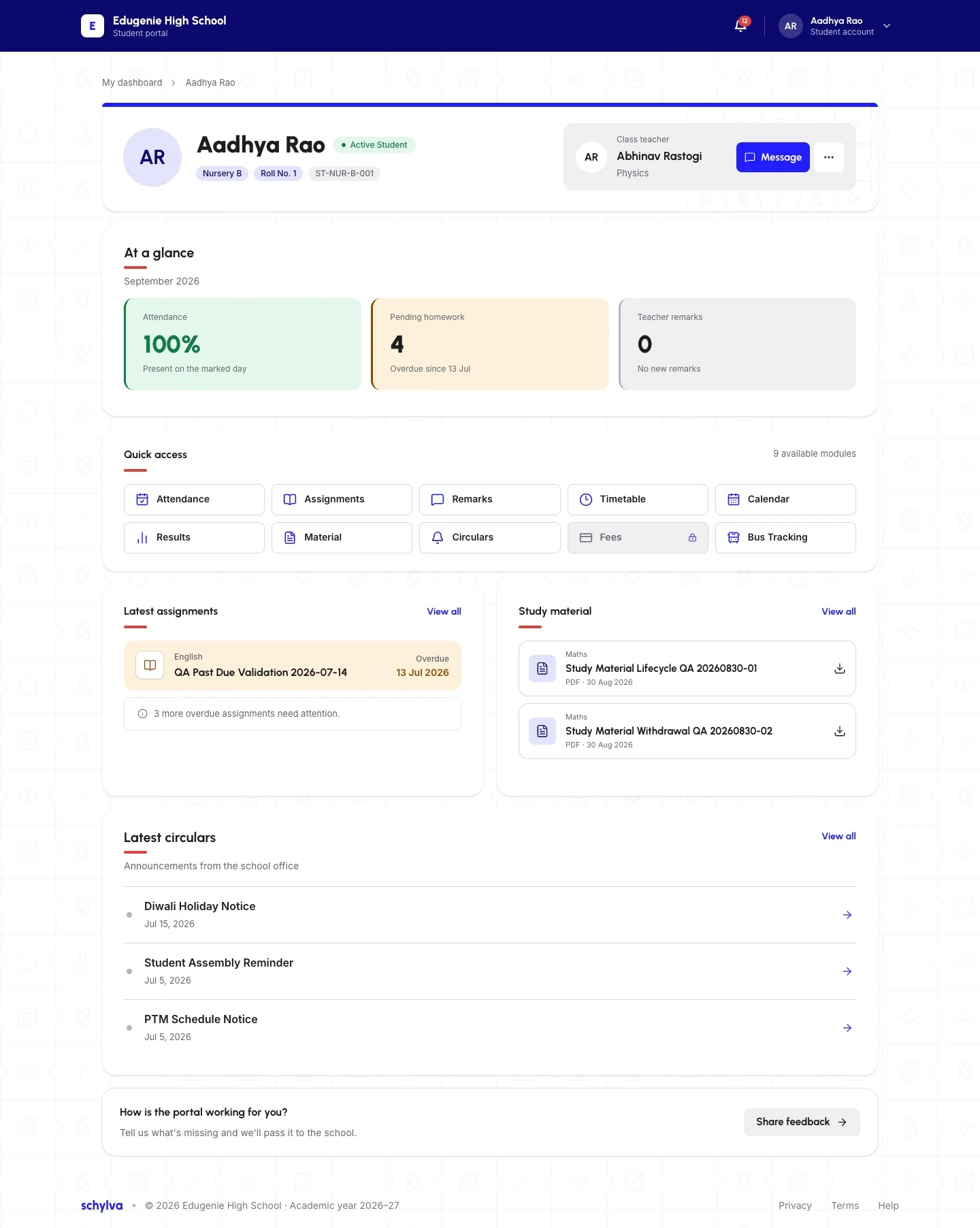
Full desktop-web capture with approved demo data. Scroll the image or open it larger.
Student dashboard on desktop and mobile web. The tablet capture is still pending. These are web screenshots, not native apps. Preview switching needs JavaScript. Read the web and app scope.
Dedicated iOS and Android apps are in development for administrators, teachers, parents and students. At launch, each confirmed role workflow is planned for mobile-appropriate navigation—not an identical web layout. Downloads will appear only after store listings are live and verified.
Follow the mobile-app directionA THOUGHTFUL START
Confirm the academic year, board context, people, classes, fee setup, current data and priority workflows.
Agree scope and owners in writing. Configure school settings and accounts, prepare supported initial data and validate representative records together.
Train the relevant teams, validate role workflows, confirm readiness and agree your school-specific go-live and support plan.
Included from the start: standard onboarding, initial school configuration, initial data migration, staff training and ongoing product support. Migration details, training, owners, validation and timing are agreed in your school’s written scope.
AFTER GO-LIVE
Product support runs Monday–Friday, 10:00 AM–6:00 PM IST, excluding public holidays. We target resolution within 24–48 working hours—not an unconditional guarantee. Third-party dependencies, required school information or action, and circumstances outside Schylva’s reasonable control may require more time.
Your enrolled-school support route is provided during onboarding.
Review support detailsCLEAR BOUNDARIES
Role-aware access and school-scoped data boundaries keep each person in the relevant school context. Discuss your school’s permissions, data requirements and validation checks before go-live.
Review the security approachA SUPPORTED START. A CLEARER COMMITMENT.
₹0 qualifying Schylva access fees
From approved activation through your school’s configured 2028–29 academic-year end date. A school-specific end date—not a fixed two-year period.
Full offer terms and the definitive school agreement apply. A demo request starts a conversation; it does not activate the offer.
GOOD QUESTIONS. USEFUL ANSWERS.
Practical guides, checklists, explainers and source-checked education updates. Open to everyone. No email gate.
Schylva is built first for schools in India, across CBSE, ICSE, Indian State Boards, IB, Cambridge and other school frameworks. International markets will follow. A walkthrough helps establish your school’s actual workflows and requirements.
Explore school and board fitThe web application has desktop, tablet and mobile views. Native iOS and Android apps are in development, with confirmed launch workflows planned for administrators, teachers, parents and students. They are not available to download yet. Confirm current availability with the team; these placements are not native-app screenshots.
See the mobile-app directionStart with a focused walkthrough. We discuss your priorities, agree the implementation scope, validate supported data and prepare the relevant teams. Go-live depends on your school’s readiness, not a universal setup-time promise.
Explore implementationA focused 45-minute conversation about your school. We respond within two working days, excluding weekends and public holidays, to confirm priorities, participants and scheduling. It is an enquiry, not an instant booking, school-account activation or offer eligibility.
Request a demoAdministrators, teachers, parents and students are included in the launch scope. Each uses the records and actions permitted by their role and school context. A parent’s view stays linked to their children; it is not the administrator’s workspace.
Explore the four school rolesApproved schools must complete school-account activation by 31 March 2027, 11:59 PM IST. Access runs from qualifying activation through your school’s configured 2028–29 academic-year end date, not a fixed two years or 24 months. An enquiry, demo, quote or incomplete onboarding does not qualify.
Read eligibility and full termsPayment-gateway transaction charges remain payable by the school under the provider’s terms. Receive 30% off each year’s applicable school-specific Schylva price after the qualifying period. This annual discount is non-cumulative: it does not compound or reduce the previous year’s discounted amount. Student count is the pricing basis; your written quote confirms the applicable rate and resulting price.
Review school-specific pricingSchool communication centres on circulars, acknowledgements, remarks and Schylva in-app and push notifications at launch. WhatsApp and non-login SMS are not launch communication channels. The current release does not provide product-managed login-verification SMS delivery.
Review communication scopeLET’S START WITH YOUR SCHOOL
Tell us your priorities. We’ll confirm the participants and a suitable time.
School context, participants and priorities.
Relevant roles and records through real product screens.
Implementation, student-count pricing and the offer.
Open questions, owners and useful next steps.
We respond within two working days, excluding weekends and public holidays, to confirm priorities, participants and scheduling. This is an enquiry, not an instant booking. Bring your approximate student count and priorities—not student records or confidential school data.