School
Person context
- Start with
- Person + school
- Decision
- Confirm holder
- Next context
- Choose category
Responsibility and limits
Confirm school.
Use the account record and school relationship.
People records do not create or activate logins.
School user account management
School Administrators need Users & Login Management access to maintain four school account categories, status and permissions.
Align ownership. The verified release does not include SMS delivery, SSO, SCIM or a custom-role builder.
People, accounts and access
The access decision map
Six stages show setup, access and verification boundaries. Account category, status and administrator permissions are separate decisions—not interchangeable labels.
School
Use the account record and school relationship.
People records do not create or activate logins.
Category
Use the Administrator, Teacher, Parent/Guardian or Student path.
Categories select experiences—not custom roles.
Availability
Use supported active, inactive or blocked states.
Invited/alumni states are category-specific.
School Administrator
Choose from Dashboard & Analytics, Users & Login Management, Attendance, Fees, Exams & Results, Timetable, Communication & Documents, and Settings.
Eight named interface permission groups; effective access follows the mapped permission checks—not custom roles.
Verification
The verified release does not provide a public delivery mechanism for the mobile-number/six-digit-code interface.
Approve delivery; do not assume resend or expiry.
Session
Representative protected requests resolve school, role and account.
Other roles receive no User Access administration controls.
A guide to the supported decisions, not an account-creation form or an automated provisioning sequence. Expand a decision for its responsibilities and limits.
School Administrator accounts
Choose from the named interface permission groups. Effective access follows mapped permission checks. Administrator designations are labels, not separate authorization roles.
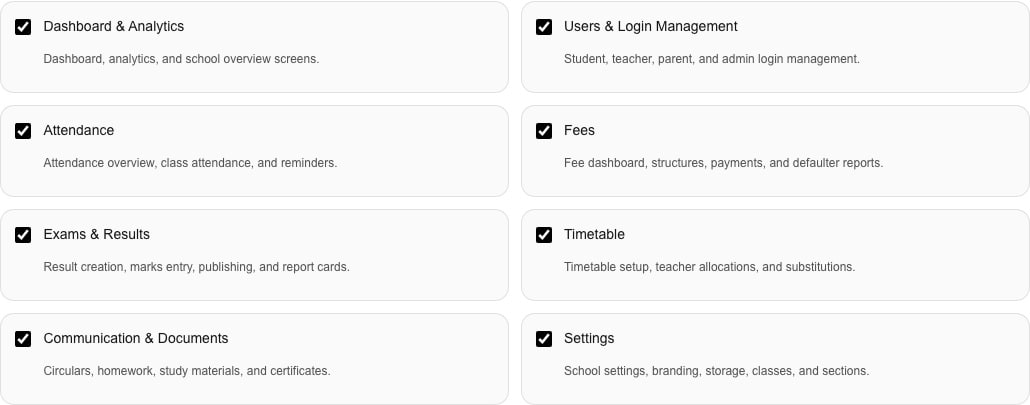
Current Schylva web workflow · fictional school data
Focused fictional example. On smaller screens, expand to inspect all eight groups; selections are not defaults or recommendations.
One owner, four account paths
School Administrators maintain supported account controls; other roles use their own context.
Administers supported controls
Users & Login Management access is required to maintain accounts and permissions.
Uses assigned or linked context
Teachers use assigned work; they do not assign access.
Uses assigned or linked context
Parents/Guardians see linked active Students—not User Access controls.
Uses assigned or linked context
Students use their context; they do not manage access.
Relationship evidence
Fictional school data proves only visible states. The account overview is in the hero and the permission grid is above. This third capture shows a configured family relationship.
Parent/Guardian · Linked-Student context
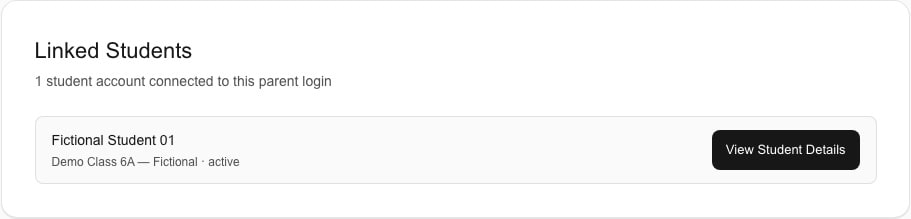
Current Schylva web workflow · fictional school data
Linked Student—not automatic matching, creation or activation.
Controls with clear limits
Review scope, rollout decisions and boundaries.
Ownership before onboarding
Trace controls without production identities. Use fictional or redacted examples; do not share real identities, credentials, login codes or student records.
Confirm ownership and access.
Confirm statuses, ownership and session limits.
Map work to groups, not designations.
The current verified release does not provide SMS delivery.
Questions schools ask
Answers reflect the verified release.
School Administrator, Teacher, Parent/Guardian and Student each have a path.
Yes. Select eight named interface groups per School Administrator; effective access follows mapped checks—not custom roles.
No. Designations are labels; supported permission checks determine effective access.
No public SMS delivery is verified. Approve delivery for the code interface before rollout.
No. Account creation does not prove automatic family matching or Student linking; maintain the relationship separately.
No. SSO, SCIM, directory sync, custom roles, user-defined RBAC and policy engines are outside scope.
An access-focused demonstration
Review categories, status, permissions and verification with fictional examples.
We will confirm scope and identity requirements separately. Use fictional examples, not production identities or login codes.