Define before display
Build the school’s metric taxonomy before selecting a dashboard.
A school-wide taxonomy is a catalogue of questions and definitions owned by the school. It helps leaders decide which numbers are trustworthy and useful before asking any product to display them.
| Metric family | Bounded school question | Possible maintained source |
|---|---|---|
| Learner and enrolment | Which active learner records belong in this reporting cohort? | Admission, withdrawal, class and section records with effective dates |
| Attendance and participation | Are expected attendance records complete, and what maintained pattern is visible? | Calendar, timetable, roster and authorised attendance records |
| Teaching and timetable operations | Which scheduled classes or activities were delivered, changed or left unconfirmed? | Approved timetable, substitution, closure and completion records |
| Assessment and learning | Is the selected assessment record complete and genuinely comparable? | Exam definition, maximum marks, scored entries and permitted result statuses |
| Fees and finance | Which billed, received, waived, refunded or unreconciled amounts need review? | Approved fee schedule, ledger, receipt and settlement records |
| Family communication and service | Which approved communications or service requests remain open? | Authorised communication register, response status and closure record |
| People, facilities and operations | Which authorised staffing, resource or operational checks remain due? | School-owned duty, inventory, maintenance or review records |
Complete one metric-definition record for every recurring number.
| Definition field | School-owned record |
|---|---|
| Question | Metric name: ____________________ · decision or review question: ______________________________ |
| Source | Maintained source: ____________________ · source owner/version: ____________________ |
| Unit / numerator / denominator | Unit: __________ · numerator: __________ · denominator: __________ · rounding: __________ |
| Cohort / date range | Campus/class/group: ____________________ · from: __________ · to: __________ |
| Exclusions / statuses | Included: ____________________ · excluded: ____________________ · missing/withheld treatment: __________ |
| Owner / verifier | Definition owner: ____________________ · source verifier: ____________________ |
| Freshness | Data cut-off: __________ · refresh frequency: __________ · stale after: __________ |
| Privacy / access | Purpose: ____________________ · authorised roles/view: ____________________ · retention/export rule: __________ |
| Action / review | Allowed follow-up: ____________________ · action owner: __________ · next definition review: __________ |
Start with meaning
Define the question before choosing the metric.
A report becomes useful when a school can explain what it is trying to learn, which records answer that question and who is responsible for the follow-up.
The phrase school analytics can cover everything from a class attendance summary to a multi-year planning model. That breadth creates a common failure: the school starts with whatever a system can chart, then searches for a decision that might fit it. Reverse that sequence. Begin with a recurring school question and work backwards to the minimum trustworthy evidence.
01 · Question
What do we need to understand?
Use one bounded question such as class attendance in a selected period or completion of a selected exam result set.
02 · Source
Which maintained records answer it?
Identify the operational workflow, owner, date range, class, exam and status values that feed the summary.
03 · Calculation
What is counted or excluded?
Record the numerator, denominator, missing states, withheld rows, grading rules and rounding method.
04 · Context
What could change the interpretation?
Consider calendars, holidays, timetable changes, late admissions, incomplete marking and small cohorts.
05 · Ownership
Who verifies and follows up?
Name the authorised role that checks the source and the school process used before any action is taken.
| School question | Source record | Check before interpretation | Responsible follow-up |
|---|---|---|---|
| How is this class attending in the selected period? | Maintained class attendance records | Expected records, marked days, date range and status definitions | Authorised attendance or academic owner |
| Why is an exam summary incomplete? | Selected exam and scored-entry records | Missing, absent, withheld and unscored entries | Exam or result-record owner |
| Has a subject pattern changed? | Comparable subject and assessment records | Assessment design, maximum marks, cohort and grading consistency | Academic leader with the relevant teacher |
| Can this trend support a school decision? | Stable records across comparable periods | Definition changes, calendar effects and data completeness | School leader after source-owner verification |
India’s UDISE+ reporting describes school-level online collection, validation checks and verification across administrative levels. That public system is not the same as a school ERP, but it illustrates a useful principle: credible decisions depend on current records and deliberate validation. Read the official UDISE+ 2024–25 report for the source methodology; this guide does not claim that Schylva submits, reconciles or certifies UDISE+ data.
Read attendance responsibly
An attendance percentage needs a denominator and a calendar.
The same percentage can mean different things when marked days, expected records, late admissions, timetable changes or status definitions differ.
Before comparing a class, learner or month, write down what counts as expected attendance and how Present, Late, Absent, Leave and Not marked states affect the calculation. Confirm whether the summary counts school days, scheduled periods or maintained records. A percentage without that denominator is not yet an operational answer.
Use a repeatable attendance review sequence.
Fix the scope.
Choose the class, section, academic period and valid date range before opening a trend or ranking.
Check completeness.
Identify unmarked days or records and confirm whether the timetable or calendar changed inside the period.
Read the status mix.
Review the breakdown behind the average so Leave, Late, Absent and Not marked records are not collapsed into one unexplained signal.
Compare like with like.
Use comparable periods and definitions. Document any event, closure, admission change or operational disruption that affects the comparison.
Verify before follow-up.
Open the maintained attendance record, involve the owning role and use the school’s approved process before contacting a learner or family.
| Visible signal | Useful question | Source check | Avoid assuming |
|---|---|---|---|
| Class attendance average | What is the overall maintained-record pattern for this scope? | Expected versus attended records and marked days | That every learner had the same opportunity or timetable |
| Status breakdown | Which states explain the average? | Definitions and ownership of each status | That Leave, Late and Not marked mean Absent |
| Monthly trend | When did the maintained-record pattern change? | Comparable date windows and school calendar | That the chart explains why it changed |
| Below-threshold cue | Which record needs verification under the school’s process? | Applicable rule, class, board and calculation | Prediction, intent or an automated intervention decision |
Interpret assessment records
Check result completeness before comparing performance.
A class or subject summary can look precise while still depending on missing entries, withheld rows, maximum marks, assessment design and cohort context.
Start with one selected exam or assessment and confirm that the result set is the intended version. Then separate complete scored entries from missing, absent, withheld or otherwise unscored rows. Record whether the calculation uses raw scores, percentages, grade bands or another school-defined method before comparing students, subjects or periods.
Completeness
Which rows can enter the summary?
Separate complete scored entries from missing, absent, withheld and unscored records before reading averages or ranks.
Comparability
Are the assessments genuinely comparable?
Check maximum marks, subject coverage, assessment design, grade boundaries, cohort and instructional period.
Interpretation
What can the summary actually establish?
Treat the result as descriptive evidence for review, not a diagnosis of ability, effort, teacher quality or future performance.
Ask these questions before a result meeting.
- Is this the intended exam, academic year, class and result-set version?
- How many expected entries are complete, missing, absent, withheld or unscored?
- Do subject summaries use the same maximum marks and grading basis?
- Is the cohort large and stable enough for the comparison being discussed?
- What changed in curriculum coverage, teaching time or assessment design?
- Which source record must be corrected before the summary is discussed again?
- Who may see the result and who owns any learner-level follow-up?
The National Education Policy 2020 discusses assessment as part of learning and development. Schools should still apply their own board, academic and specialist guidance when deciding how a particular result is interpreted or communicated.
Protect the record
Data quality and access control belong in the same review.
A technically accurate calculation can still be inappropriate if the source is stale, the audience is too broad or more personal information is exposed than the question requires.
Build a small data-quality rhythm around each report.
Before the review
Confirm the source owner, reporting cut-off, expected records, allowed statuses and any known gaps or corrections.
During the review
Keep the filter scope and definitions visible. Record questions against the source instead of editing a conclusion around an unexplained number.
After the review
Assign corrections, record the decision and set the next review date. Do not preserve unnecessary exports or screenshots as parallel records.
Use a purpose-and-access checklist.
- State the school purpose before opening learner-level data.
- Give access only to the authorised role that needs the view.
- Use class or aggregate views when learner detail is unnecessary.
- Use fictional or redacted examples for vendor demonstrations and support conversations.
- Avoid downloading, messaging or duplicating records without a defined need and approved process.
- Document retention, correction, deletion and exit responsibilities in the school’s operating process and vendor agreement.
- Keep an escalation path for mistaken access, disclosure or an unexplained data change.
| Control | Question to record | Evidence to retain |
|---|---|---|
| Purpose | Why does this role need this report? | Named operating purpose and review owner |
| Access | Which active roles can open the view? | Approved role map and periodic access review |
| Definition | How is each metric calculated? | Versioned metric definition and exclusions |
| Quality | Who corrects incomplete or disputed records? | Issue, owner, correction and verification date |
| Retention | What copies or exports exist, and for how long? | Approved location, retention decision and deletion path |
Product capability boundary
What Schylva’s current analytics scope does—and does not—support.
The general practices above apply beyond one product. The following narrower section describes Schylva’s current public claim set so schools can evaluate it without inference.
Current product evidence
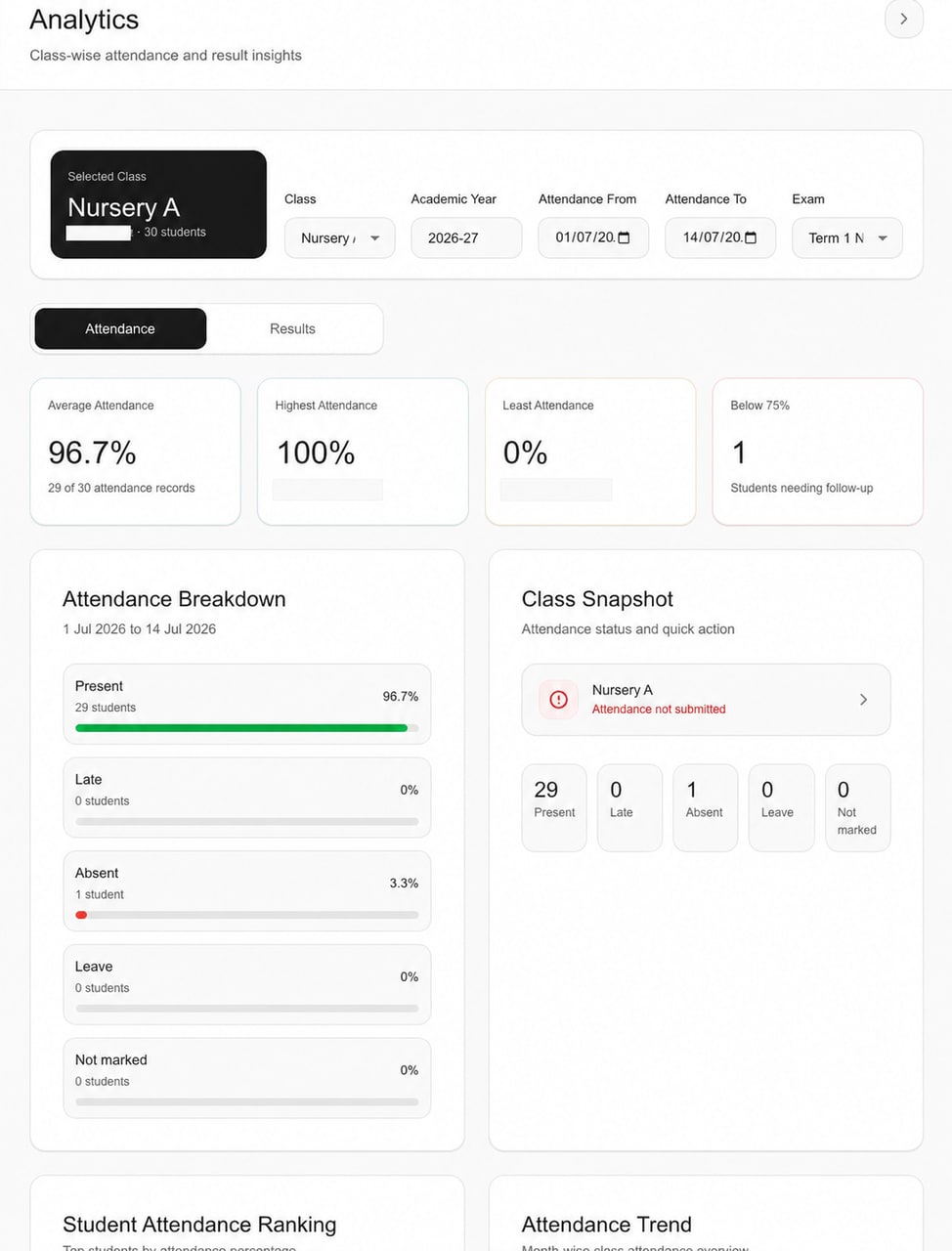
Administrator attendance analytics for a selected class and date range.
The publication-safe focused view shows the selected scope, summary cards and status breakdown. It does not substantiate prediction, benchmarking, custom rules or report export.
Current Schylva administrator Analytics interface · publication-safe derivative with account identity excluded and person-name fields removed.
Static product evidence, not an interactive report. Open the viewer to inspect the unchanged screenshot.
Supported today
- Dashboard-permitted School Administrator access
- Class and valid date filtering for attendance summaries
- Attendance average, status breakdown, rankings and monthly trend from maintained records
- Selected-exam class, student, completion and subject summaries from maintained records
- Loading, empty and invalid-date states
Confirm for your school
- Representative classes, academic year, exams and source owners
- The meaning of expected records, marked days and the fixed below-75% cue
- Complete rows, withheld entries, subject averages and grade-band fit
- Which administrators need access and which extra reporting requirements exist
Not currently claimed
- Prediction, AI recommendations or automated decisions
- Board, peer-school or cross-school benchmarking
- Custom BI, custom rules, scheduled reports, CSV/PDF analytics exports or reporting APIs
- Fee, financial or exhaustive cross-module reporting
- Teacher, Parent or Student analytics access
Source-workflow context
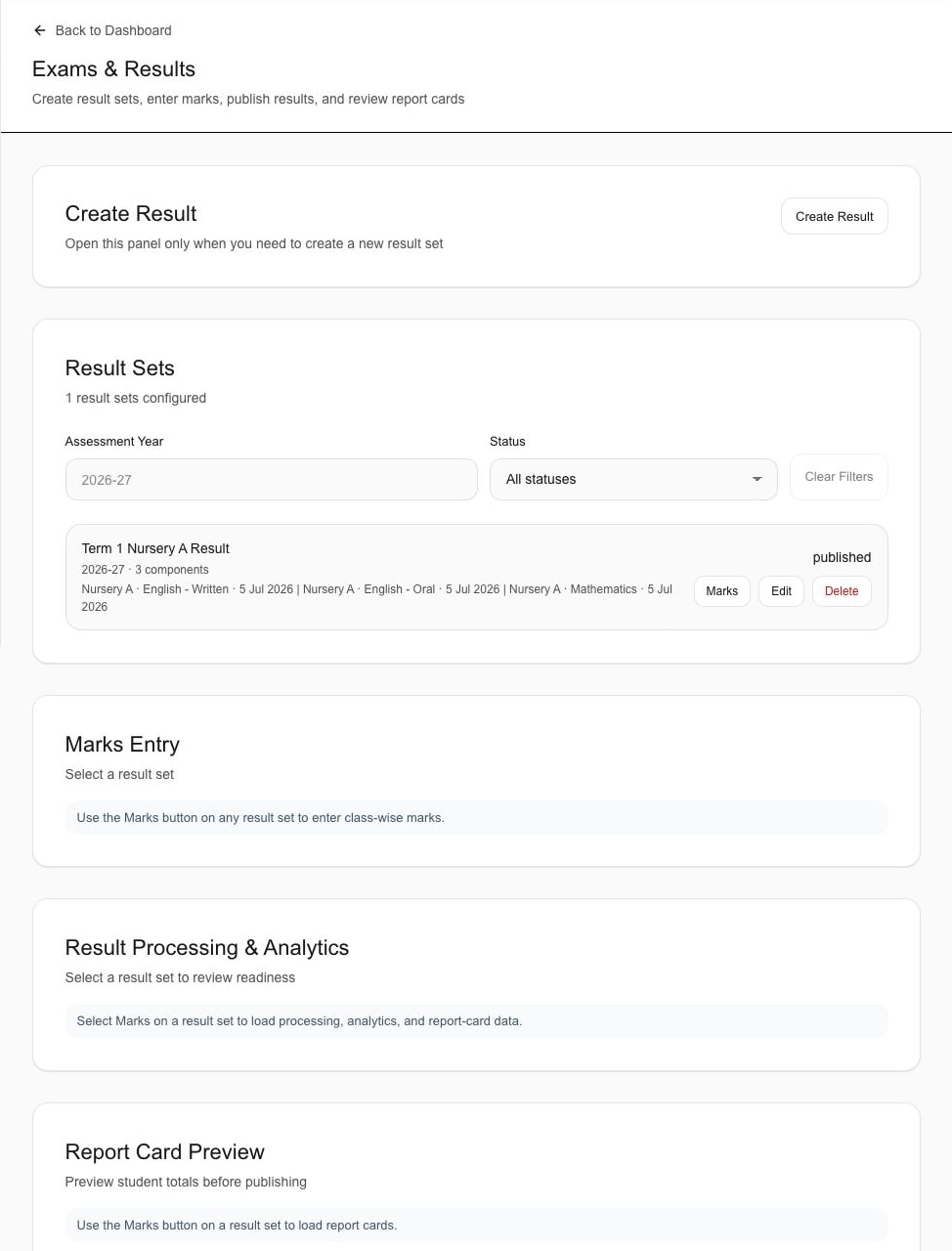
Keep selected-exam summaries tied to maintained result records.
This supporting crop shows a maintained result set, assessment year and published status. It is not evidence of custom reporting, export, prediction or the Analytics Results-tab interface.
Current Schylva Exams & Results source workflow · publication-safe focused crop.
Static product evidence, not an interactive report. Open the viewer to inspect the unchanged screenshot.
Put the guide to work
Create one small, governed reporting rhythm before adding more dashboards.
A school can learn more from four well-defined recurring questions than from dozens of unexplained charts.
A practical 30-day starting plan.
Week 1 · Choose four questions.
Select two attendance and two selected-exam questions that already recur in school operations. Name the decision and owner for each.
Week 2 · Document definitions.
Record the source, filter scope, numerator, denominator, statuses, exclusions, cut-off and correction path for every metric used.
Week 3 · Test with redacted examples.
Run complete, incomplete and disputed examples. Confirm that authorised roles can trace the summary back to the maintained record.
Week 4 · Hold and review one meeting.
Separate observation, interpretation and action. Capture questions, source corrections, decisions and the next review date.
| Cadence | Use it for | Keep it bounded by |
|---|---|---|
| Daily or operational | Missing records, marking completion and immediate source correction | Small authorised audience and current operational scope |
| Weekly | Class attendance questions and unresolved data-quality items | Comparable school days, status definitions and named owners |
| After a selected exam | Entry completion, class and subject summaries | Result-set version, withheld rows and assessment comparability |
| Term or leadership review | Patterns that may inform planning questions | Stable definitions, longer context and verified source records |
The goal is not to make every school decision numerical. It is to make the evidence path explicit when a maintained record can help: what the school asked, what the record shows, what it cannot establish and who remains responsible for the next step.
Frequently asked questions
Clarify the decision and its boundaries.
Use these answers as a starting point, then verify the relevant source, rule and school process.
What is school analytics?
School analytics is the structured use of maintained school records to answer a defined operational or academic question. A useful analytics process keeps the source, calculation, context, authorised audience and responsible follow-up visible.
Which school analytics metric should a school start with?
Start with a recurring question that already has a maintained source and a clear owner. A bounded class-attendance or selected-exam completion question is usually easier to define and verify than a broad performance score.
Can an attendance percentage be interpreted on its own?
No. Confirm the class and date scope, denominator, marked days, expected records, status definitions, calendar and applicable school or board process before interpreting an attendance percentage.
What should be checked before comparing exam results?
Check the exam and result-set version, entry completeness, absent or withheld rows, maximum marks, grading basis, cohort, curriculum coverage and assessment design. Compare only records that are genuinely comparable.
Does Schylva provide predictive analytics or custom BI?
No. Schylva’s current public claim set covers descriptive administrator summaries for supported attendance and selected-exam result questions. Prediction, AI recommendations, automated decisions, benchmarking, custom BI, scheduled reports, analytics exports and reporting APIs are not currently claimed.
Is this guide legal or regulatory advice?
No. The guide links to official sources for further reading but does not determine which laws, commencement provisions, board rules or school-sector obligations apply. Schools should verify current official requirements and obtain qualified advice where needed.
Primary sources and further reading
Read the official material behind the context.
Sources were reviewed when this guide was updated on 2 September 2026. Always verify the current official version before relying on a rule or requirement.
Ministry of Education, Government of India
UDISE+ Report 2024–25 — Existing StructureUsed for the general principle that credible education decisions depend on current, validated records. No UDISE+ integration or compliance claim is made.
Ministry of Education, Government of India
National Education Policy 2020Background reading on education and assessment direction; not used as a product-capability claim.
Central Board of Secondary Education
Admission and examination guidanceUsed only to scope the published 75% attendance reference to its CBSE Classes IX–XII examination context.
Ministry of Electronics and Information Technology
Digital Personal Data Protection Act, 2023Primary statutory source for further reading. This guide does not provide a legal interpretation.
Ministry of Electronics and Information Technology
Digital Personal Data Protection Rules, 2025Official rules page, including phased commencement material. Verify current notifications and obtain advice for applicability.